


Buy Valhalla VintageVerb if you want one reverb for colored vocal plates, synth halls and chambers. Buy Baby Audio Crystalline if you regularly need to keep a busy vocal clear while controlling when its reverb arrives. The choice gets easier when you compare both on the same vocal at a similar level, then ask each one to handle a timed throw.
Valhalla VintageVerb vs Crystalline: Comparison Table
| Decision | Valhalla VintageVerb | Baby Audio Crystalline |
|---|---|---|
| Main reason to buy | Try distinctly colored plates, chambers and halls quickly. | Shape when a tail starts, how long it lasts and how it sits behind the source. |
| Core controls | Mode, Color, pre-delay, decay, damping and modulation. | Start, End, Size, Ducker, Damping and Sides. |
| Tempo-aware throws | Calculate the pre-delay in milliseconds and automate the send. | Use Sync for note divisions and automate the send. |
| Keep an active lead clear | Adjust pre-delay and return EQ. Add a sidechain compressor for ducking. | Use the built-in Ducker to lower the wet signal while audio feeds the plugin. |
| Regular U.S. price | $50 direct from Valhalla DSP. | $99 at Plugin Boutique. $5 through Dec 9, 2026, when checked. |
Run the same vocal through both reverbs
Pick two bars of a dry vocal with a busy first line and a brief gap at the end. Loop it with the beat. Create a stereo return for each reverb and feed both from the same point in the vocal chain. If you normally use a de-esser, keep it active for both sends. Solo one return at a time while the dry vocal and beat stay audible.
Match the setup first. Set both plugins fully wet. Start at 35 ms of pre-delay and about 1.2 seconds of decay in each. Turn off Crystalline’s Ducker, Gate, Shimmer and Reverse for this first pass. Adjust the return faders by ear until the tail on the final word is comparably loud. The reverbs can build up and fade differently even with identical time settings.
In VintageVerb, keep the mode fixed and change the color
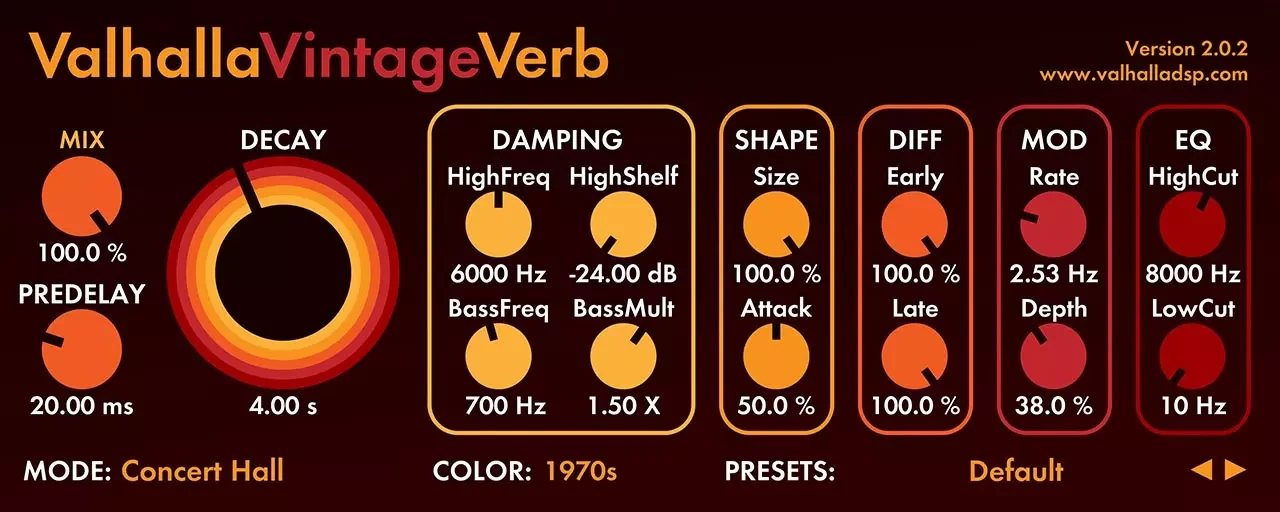
1. Set Mode to Plate and Color to Now. Enter your pre-delay and decay, then play the same phrase. Click the Mix label to lock the fully wet setting if you plan to browse presets. Listen to the consonants just before the tail comes in. If the vocal feels farther away than you want, turn the return down before changing the timing.
2. Switch to 1970s and leave Plate selected. Match the return level again if needed. Listen for the change in brightness and texture after the last syllable. If that change suits the track, use the EQ controls to refine the wet signal.
3. Leave Color alone and switch from Plate to Chamber. Listen to the first part of the reverb. The space around the vocal can feel different even when the tails fade at similar times. The Mode and Color controls let you change how the space develops and how it is colored independently.
In Crystalline, separate size from decay

1. Set the Sync/MS switch to milliseconds. Use Start for the 35 ms pre-delay and End for the decay. Pick a moderate Size and keep the output fully wet. If you browse presets, Wet Lock holds the mix setting. Check the timing after each preset change.
2. Increase Size while leaving End at the same setting. Listen for a broader space without deliberately extending the tail. If the return sounds sharp on an S or T, try a little Smoothing and recheck the wet level. For a broad change in brightness or low-end buildup, start with Damping.
3. Turn up the Ducker a little while the vocal is still feeding the return. Listen for the words to remain clear and the tail to rise into the gap. Try Gentle mode if the reverb comes back too abruptly. A send feeding only one word may give the ducker little to act on, so try it on the full phrase first.
Try a timed throw on the last word
Automate the send so only the final word feeds the return. At 120 BPM, one sixteenth note lasts 125 ms and a quarter note lasts 500 ms. Listen against the next line, since the word itself takes time to pass through the send and the return fades gradually.
In Crystalline: Turn on Sync, choose a sixteenth note for Start and try a quarter note for End. If you change the tempo during production, the same note division stays tied to the beat. Shorten End if the throw covers the next lyric.
In VintageVerb: Set pre-delay to 125 ms and decay to about 0.5 seconds. Try Plate in Now for a brighter tail. At another tempo, divide 60,000 by the BPM for a quarter note in milliseconds, then divide by four for a sixteenth. For ducking, place a compressor after VintageVerb on the return and key it from the dry vocal where your DAW supports external sidechaining.
Listen through the next lyric
Play from one bar before the throw through the next line. Crystalline’s internal Ducker only reacts to audio reaching it: if the send closes after one word, the next lyric cannot trigger that instance. For reliable ducking under the whole lead, place an externally keyed compressor after either reverb, or automate the return level. Keep the send automation for choosing the word.
Conclusion
VintageVerb is my pick for an everyday reverb. If your projects range from vocals over beats to ambient keys, the modes and color settings give you several ways to find a useful space quickly. At $50 direct from Valhalla DSP, its value is clearest if you spend more time choosing the texture of the reverb than automating when it comes in.
Crystalline is my pick for timing and clean-up. Choose it when a long tail regularly masks a busy lead, a throw needs to follow the tempo, or a wide return adds too much low-end stereo energy. Sides can narrow the low frequencies of the wet signal while retaining the mono component. Ducking and sync are available in the plugin, which is handy if you want to save those decisions with the preset.
On November 17, 2026, Plugin Boutique listed Crystalline at $5 through December 9, with a $99 regular price. The offer makes Crystalline the lower-cost choice if you want those timing controls. Check the current USD checkout price before buying.
Read the full Crystalline review for more of its creative tools. If you are choosing between Valhalla’s products, see the VintageVerb vs Room comparison.
Source: Baby Audio Crystalline manual: timing, Sides and ducking.
Source: Valhalla VintageVerb official modes, Colors and price.
Editorial review: November 17, 2026. Prices are dated references; check the current regional checkout.


