
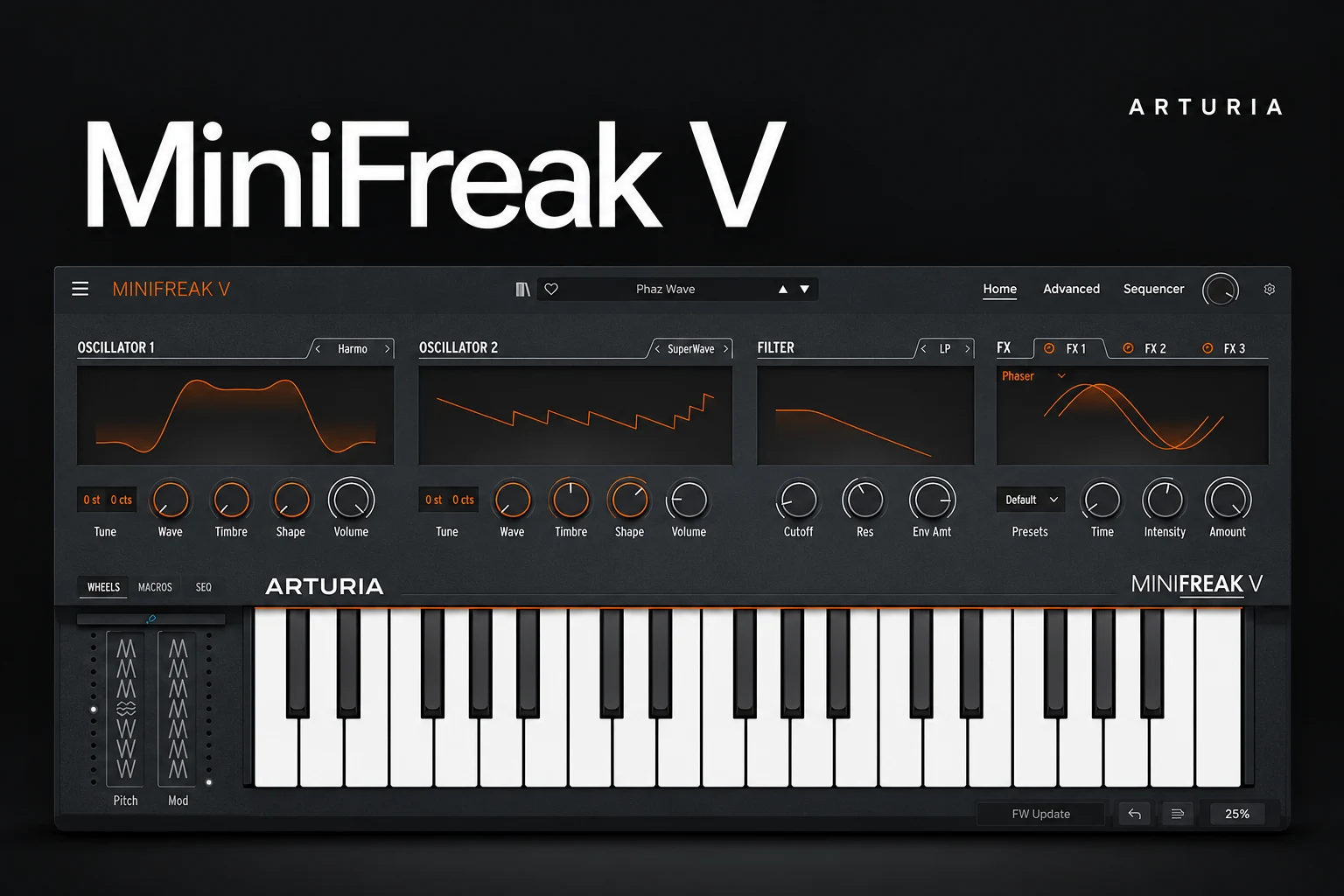

MiniFreak V is worth considering if you want an experimental synth with a clear, playable workflow rather than another large preset collection. Arturia combines digital sound engines, modeled analog-style filtering and expressive sequencing in one instrument. We would shortlist it for electronic leads, evolving pads and unusual melodic parts.
You do not need the MiniFreak hardware to use the software. If you already own that keyboard, check your Arturia account first: MiniFreak V is included with the hardware. For software-only buyers, the real question is whether its way of making sounds adds something useful to the synths you already own.
What is MiniFreak V?
MiniFreak V is a virtual instrument related to Arturia's MiniFreak hardware synth. It runs inside a compatible DAW or as a standalone application. The software models the instrument's analog filter behavior; there is no physical analog circuit inside the plugin.
Its attraction is the combination of a compact playing surface and deeper editing pages. You can begin with a patch, adjust the sound engines and filter, then explore modulation and sequencing when the part needs more detail.
The features that shape the buying decision
| Feature | Current documented specification | Why it matters |
|---|---|---|
| Polyphony | Six voices | Try your actual chords and release settings before buying. |
| Sound engines | Two engines, 31 oscillator modes in total | Several synthesis approaches within one workflow. |
| Modulation | Two LFOs per voice, a cycling envelope and a modulation matrix | Movement can become part of a patch. |
| Sequencing | 64 steps and four modulation automation lanes | Build patterns and parameter movement inside the instrument. |
| Effects | Three slots, with 13 effects to choose from | Shape the patch before adding a separate effects chain. |
These details were checked against Arturia's current product information on 18 October 2026. Older descriptions may list fewer engine modes or effects.
What the recent updates add
Arturia's version 5 update introduces user sample and wavetable import. Its documentation describes WAV, AIFF and FLAC sample import, converted to 12-bit / 32 kHz material up to six seconds long. It also supports importing mono wavetables and adds new factory content.
That makes a short recording or a custom waveform another starting point for a patch. It does not turn MiniFreak V into a complete long-form sampler or a tool for assembling a large multisampled instrument.
SoundShaper advice: try a short, simple source first. A sustained vocal vowel, a small percussion hit or a single tonal sound makes it easier to understand what the engine changes. Choose a source you have permission to use.
The current resources page lists MiniFreak V 5.0.1.5869 and an English version 5 manual. Use the current installer and documentation when exploring these features.
Where we would use MiniFreak V
Electronic and alternative pop: a part with its own identity
Start with a short melody already written in your project. Browse for a patch that suggests the right character, then simplify it until the notes remain clear beside the vocal.
Our preference would be to give one control a musical job: brighten the chorus, soften the verse or change the texture at the end of a phrase. A distinctive sound does not need constant modulation to earn its place.
House and techno: a sequence you can shape
The internal sequencer is a reason to audition MiniFreak V if you like building movement inside an instrument. Begin with a few notes and one changing parameter. Listen to the result with the kick and percussion before expanding the pattern.
If the sequence is enjoyable on its own but distracts from the groove, shorten it or remove some movement. Treat the synth pattern as one element of the arrangement rather than a complete track.
Ambient and cinematic music: texture with a clear harmonic role
Try a restrained chord voicing and a slowly changing timbre. Play a complete progression with the release times you want. With a six-voice instrument, that is a more useful audition than hearing one sustained chord in isolation.
Listen for notes being replaced during chord changes and decide whether the response fits the part. If you regularly need dense, overlapping voicings, make that a central buying criterion rather than assuming every modern softsynth offers the same voice count.
Hip-hop and R&B: an unusual layer around the main sound
We would try MiniFreak V as a short response, a moving upper layer or an intro texture. Keep the melody and chord progression doing their job, then use the synth's character to add contrast.
If what you need is a convincing piano, guitar or string performance, choose an instrument designed for that role. A wide synthesis toolkit and a realistic acoustic library solve different problems.
Three useful demo exercises
These are suggested audition tasks, not presets we have tested. Use a song you know well so the comparison means something.
1. Make a simple bass. Start from an initial or uncomplicated patch, choose an engine and shape its envelope. Check how quickly you get a usable part.
2. Build a changing pad. Set the chord voicing and release first, then add one slow modulation. Listen through several chord changes.
3. Write a short sequence. Keep the notes simple and automate one timbral parameter. Decide whether the internal workflow feels quicker than doing the job in your DAW.
Afterward, recreate the musical roles in the synth you already use. Compare the parts inside the same song at similar playback levels. The point is to identify a useful difference in sound or workflow, not to make the new purchase win every comparison.
Do you need it if you already own a capable synth?
Not automatically. If you already produce finished basses, leads and pads comfortably, another instrument should offer more than a new browser to explore.
MiniFreak V is worth investigating when its engine combinations and sequencer encourage a different way of writing. If you prefer your current interface and reach the same musical result quickly, keep using it.
For other synth buying decisions, see our Serum 2 vs Vital comparison and our Pigments review. The right choice depends on the role you need to fill.
Hardware, V Collection and duplicate purchases
Arturia includes MiniFreak V with MiniFreak hardware and supports shared presets and linked controls between them. For a hardware owner, the software can be useful when working away from the keyboard or using multiple instances in a project.
Arturia also lists MiniFreak V as part of V Collection. Check your exact collection edition, registered products and available account offers before buying the single instrument. Owning some Arturia software does not automatically mean every current instrument is included.
Our advice is simple: confirm the licence you already have before spending. Buy the individual plugin when you specifically want MiniFreak V; consider a collection only if several included instruments have a real role in your work.
Price, demo and compatibility
On 18 October 2026, Plugin Boutique listed MiniFreak V at $199 and provided a trial download option. Check the current local checkout price and any applicable account or bundle offer before buying.
Arturia's current specifications list Windows 10 or later and macOS 11 or later, 4 GB RAM and 3 GB free disk space. It specifies a supported four-core CPU or Apple M1 on Mac, with 64-bit hosts and an OpenGL 2.0-compatible GPU. Windows ARM processors are not supported.
Arturia lists standalone operation and DAW plugin formats, and explicitly names FL Studio among compatible workflows. Use the demo in your own host and check the current requirements for your exact machine. Installation, activation and updates are managed through Arturia Software Center.
SoundShaper opinion
MiniFreak V is an appealing choice for producers who want a synth that encourages experiments within a recognizable instrument layout. The interesting buying reasons are its engine combinations, sequencing and performance controls, with user import expanding the available starting points.
We would recommend an audition for electronic production and unusual melodic parts. We would be more cautious for someone mainly seeking realistic instruments, dense pad polyphony or another ready-made preset library. Those needs deserve their own shortlist.
At the standard price, try the demo on several actual song parts before deciding. The strongest reason to buy is discovering a workflow you want to return to.
Frequently asked questions
Do I need MiniFreak hardware?
No. MiniFreak V can be used as a software instrument without the keyboard.
Is it included with the hardware?
Yes. Arturia lists MiniFreak V as included with MiniFreak. Check your registered products and activation details.
Can I import my own samples?
The version 5 update adds user sample import, with the format and duration limits described above. Use the current software and manual.
Is the filter actually analog?
The plugin models the analog filter behavior in software. That is different from the physical circuitry in the hardware.
Conclusion
Choose MiniFreak V if you want its particular combination of engine-based synthesis, sequencing and hands-on patch shaping. Check the six-voice behavior against your music, try the new import options and verify your existing Arturia licences. If those tests reveal a useful role beside your current synth, it deserves a place on your shortlist.
Editorial basis: official product documentation and practical buying recommendations; no hands-on listening test is claimed. Sources: Arturia product specifications, downloads and manuals, version 5 update, hardware integration and the Plugin Boutique listing. Details checked 18 October 2026.
![[background image] image of recording equipment (for a musician & band)](https://cdn.prod.website-files.com/68efa70811edd8e5af30a90d/6ad5421eaf14ef1dbac4dfa8_TAIP%20Review.webp)
![[background image] image of recording equipment (for a musician & band)](https://cdn.prod.website-files.com/68efa70811edd8e5af30a90d/6ad5413cb1504db30162273f_Phoscyon%202%20Review.webp)
![[background image] image of recording equipment (for a musician & band)](https://cdn.prod.website-files.com/68efa70811edd8e5af30a90d/6ad5403dd747f3fbbe4286ab_Chordjam%20Review.png)