


A stereo echo can sound wide and still get in the way if both sides repeat at the same time and have the same tone. D16 Repeater lets you give the two sides separate jobs, such as a brighter eighth-note answer on one side and a darker quarter-note trail on the other. That control is what makes it worth considering at $99, especially if you already build similar setups with two DAW returns. If most of your delay work is a quick slap or a single vocal throw, the first thing to compare is how quickly your current tools get you there.
This review uses D16’s documentation and a U.S. retailer price checked on November 10, 2026. The examples are settings to try in your own DAW, with listening cues for adjusting them to your tracks.
What changes when the two delay lines are independent?
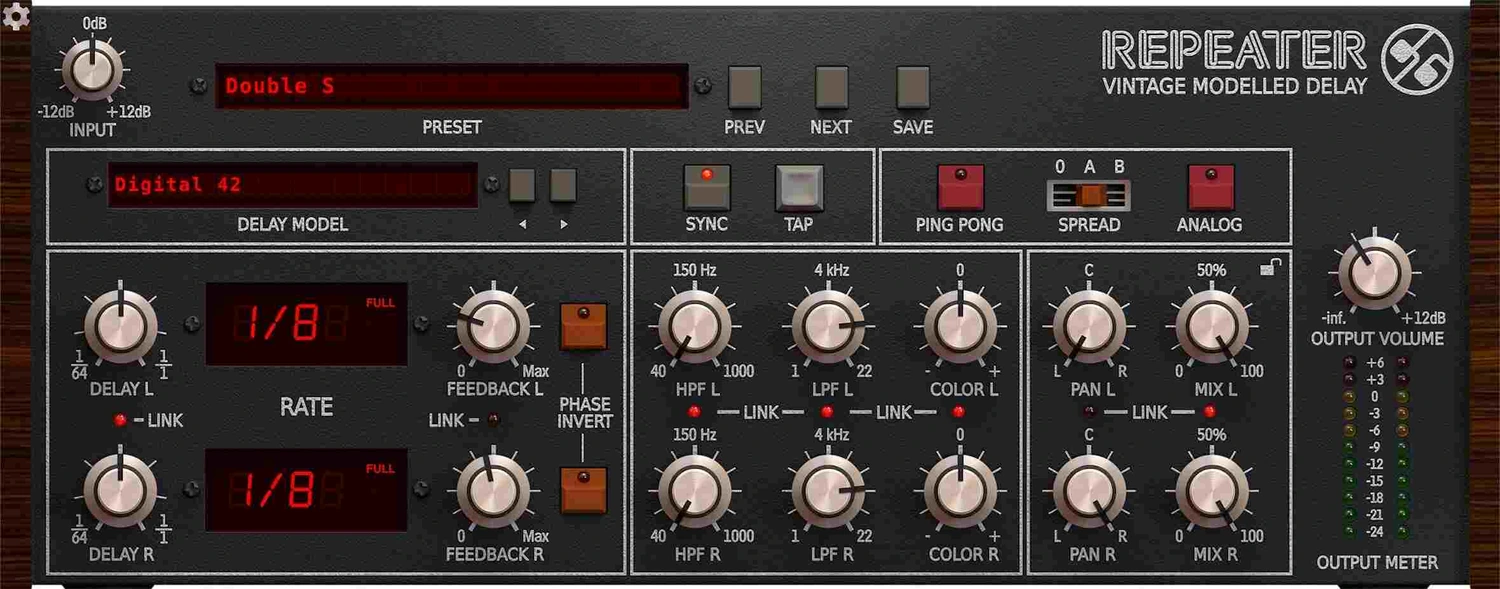
Each line has its own Delay time, Feedback, high- and low-pass filters, Color, pan and dry/wet mix. A conventional stereo repeat can give you a different time on each side. The extra step in Repeater is being able to shorten one trail, darken it and pan it closer to the center, all from the same window. That matters when the dry track already sits to one side or the arrangement has only one open pocket for the long echo.
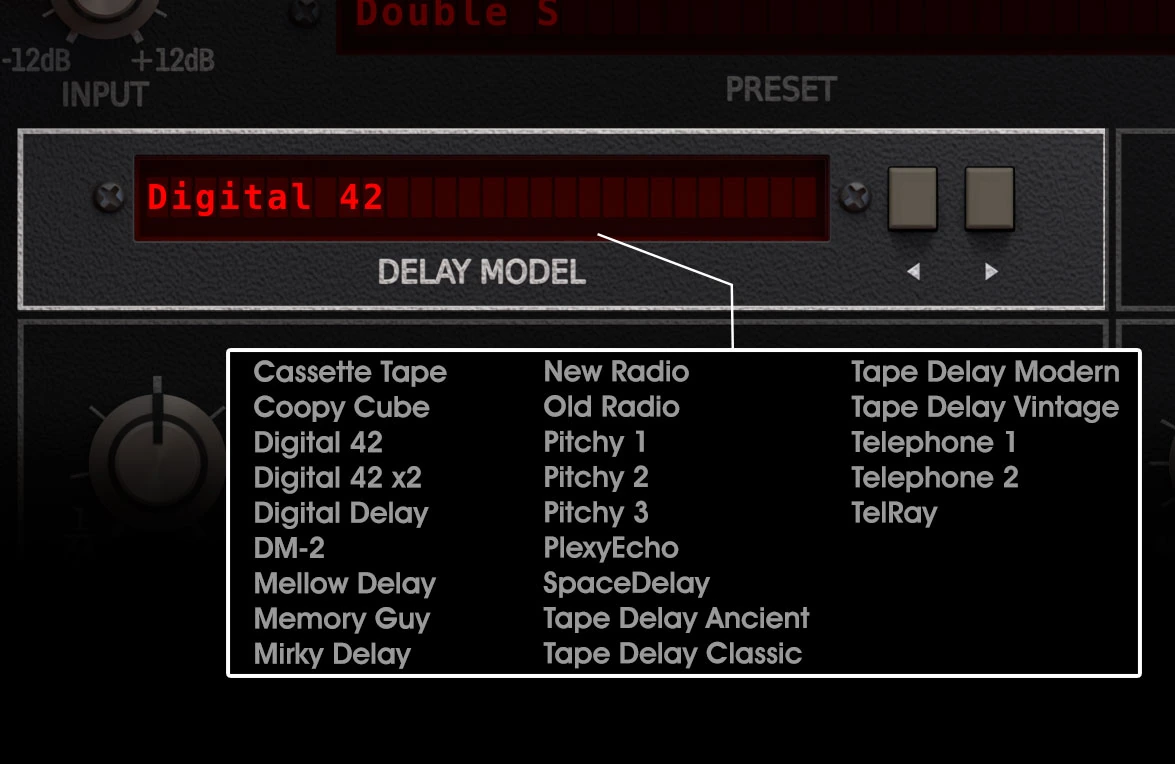
The Delay Model selector applies a common model to the two paths. You can give one side a darker filter or a different Color setting, and both sides still use the same underlying model. If you want a clean digital delay on the left and a tape model on the right, use separate instances or returns. That distinction matters if you’re buying Repeater specifically to replace a custom two-delay chain.
Set up the return before you reach for a preset
For an aux send, set Mix L and Mix R fully wet, then use the return fader to set the level in the mix. Click the padlock near the Mix controls if you plan to browse presets. It preserves the Mix settings when a preset loads, so you can audition timing and color without bringing a second copy of the dry track into the return. On an insert, bring the mix up from dry so the first repeat stays behind the source.
The small Link controls let the corresponding left and right settings move together. Start linked where you want a matched pair. Unlink the specific parameter you need to change, such as the delay time or low-pass filter. When moving a control unexpectedly changes both sides, check its Link light before rebuilding the patch.
Pick the delay model after you have the rhythm
The 23 models cover clean digital repeats, older digital units, tape, bucket-brigade circuits and effects such as radio or telephone tones. Start with Digital Delay and pick your time and feedback first. The model menu is easier to judge when you know exactly which hit you’re listening to. Change models at a similar return level and listen to the repeat’s place in the arrangement before deciding which color suits it.
| Model | Where to start | What to listen for |
|---|---|---|
| Digital Delay | A clean guitar or synth pattern | Whether the second hit lands where you want it before you add color |
| Digital 42 | A vocal throw with some early-digital grain | Whether the first repeated word stays intelligible |
| Cassette Tape | Keys or guitar that already sound very clean | Whether the extra texture still reads once the rest of the arrangement comes in |
| DM-2 | A subdued bucket-brigade echo on a pluck | Whether the repeat leaves room for the next dry note |
| Coopy Cube | A very short snare or guitar return | Whether the sound gains depth and keeps its attack in mono |
Color, filtering and Analog change different parts of the sound
Input controls the level into the clipper ahead of the delay loop. Color L and Color R change the clipper’s tonal behavior for each side. Use those controls when the first repeat already needs a different texture. Set LPF lower when a repeat is simply too bright. The HPF and LPF act after the feedback loop, so they’re the place to make one side sit darker or lighter in the return.
The Analog switch changes how the sound develops through repeated passes. Turn it on when the first echo has the right amount of detail and the later repeats should get progressively darker. A useful test is to let a bright guitar note ring through three repeats. Try the low-pass filter first and then reset it and try Analog. Listen to the first hit and the last one separately to tell which adjustment addresses the problem.
Three ways to use Repeater in a mix
Give a mono guitar two answers without widening the dry riff
Route a centered guitar to a stereo aux so both input channels receive the riff. Set the return fully wet. Choose Digital Delay, engage Sync and leave Ping Pong and Spread off while you set the two lines. Start with 1/8 on the left and 1/4 on the right. At 120 BPM those arrive at 250 ms and 500 ms, which leaves enough distance to hear them as separate answers.
Keep both Feedback controls low, then give the shorter side a little more definition. As a starting point, set the left LPF around 6 kHz and the right around 3.5 kHz. Pan the two returns apart, keeping the longer one closer to the center if that side already has another instrument. You should be able to tell which side answers first even after the dry guitar comes back in.
If the two echoes pull your attention away from the riff, turn the longer side’s Feedback down before changing its timing. If the second echo lands directly on the start of the next phrase, move the note division. Once the rhythm fits, try Cassette Tape at a similar return level. Keep the model that leaves you with the clearest dry riff in the full arrangement.
Add depth to a snare with a short Coopy Cube return
Feed a single snare to the return and select Coopy Cube. Turn Sync off and start at 15 ms on both sides with Feedback near minimum. Bring the return up until you can hear a change in the body of the snare, then move it down a little so the original attack stays in front. If the return adds too much low-mid weight, use the HPF on the wet signal before you touch the dry snare EQ.
Try Spread A at the same level. Spread offsets the timing of the two lines, with B creating a larger offset. Compare A and Off in mono after you listen in stereo. If the attack gets thin when the channels sum, turn Spread off or pull the return down. If you want the second sound to read as an obvious slap instead of a slight thickening, lengthen both delays and listen for the point where the snare starts to sound like two hits.
Make a last-word vocal throw fade away in stages
Choose Digital 42 and set both lines to a tempo-synced 1/4. Turn on Ping Pong, which cross-connects the two feedback loops. On a stereo return, automate the vocal send up for the last word of the line. Start with low Feedback on both sides and a fairly dark LPF so repeated consonants sit behind the lead. Listen to the exact gap before the next phrase and give the return only as much time as that gap allows.
Try Analog if the first echo fits but the later ones still distract. If a new lyric overlaps the tail, shorten Feedback or automate the return down during the new line. For a repeatable ducking setup, place a compressor after Repeater and key it from the full dry lead. Use the vocal send to choose the word and the sidechain to determine when the repeat can come forward.
How to fix a repeat that feels off in the arrangement
Set the first repeat by ear when the grid feels too stiff
With Sync off, use Tap to get close to the tempo of a live guitar part. Then drag the digits in the delay display to make a smaller adjustment. Start with one line so you can hear the relationship between the pick and its repeat. Add the second line only once the first sits in the pocket. If the echo feels late only during one section of a live recording, use that section for the decision or automate the send around the busiest phrases.
Separate timing problems from stereo problems
When a patch goes wide in stereo and weak in mono, start with Spread off and check the Phase Invert switch for each line. With the lines panned to opposite sides, monitor one output at a time in your DAW, then listen to both together. If each path sounds clear by itself and the pair gets hollow, check polarity and timing before compensating with more gain. Use the pan controls to find a position that still supports the source when you switch the speakers back to stereo.
If the two lines sound fine in mono but the pattern feels busier than expected, toggle Ping Pong. With it on, the feedback crosses to the other line, so the next repeat can arrive in a different place and at a different interval than with isolated feedback. Leave it off when you need two predictable parts, or bring it back in when that movement is what the arrangement needs.
Where Repeater’s extra controls pay off
Repeater’s extra controls pay off when the left and right echoes need different feedback lengths, filters or pan positions. A sparse guitar or synth part gives those differences room to matter; a dense vocal mix may need only one short, dark return.
The trade-off is a denser interface. Model, Color, Analog and LPF all affect the return in different ways, and two rows of knobs give you more places to look. For a straightforward vocal echo you can work faster with a focused return that has its own Ducker. If a $50 delay covers your main use, our Valhalla Delay review explains where its timing styles and diffusion offer a different kind of control. For other budget choices, see the delay plugins under $100 guide.
Conclusion
Choose Repeater if shaping two distinct echo paths is a recurring task. Compare it with your current return on the same phrase, with matched first-repeat levels. Its regular U.S. reference is $99, but promotions can lower the total; check the current offer rather than treating that reference as today’s checkout price.
Repeater runs inside a DAW. D16 lists VST2, VST3 and AAX on Windows, plus AU on Mac alongside those formats. Its Mac requirements list Intel and Apple Silicon. Use the demo in your DAW and on your operating system to check that the plugin opens and the interface fits your screen before buying. Plugin Boutique listed the regular U.S. price at $99 when checked, and the store shows the current checkout price.
Repeater documentation
Signal flow, delay controls, Mix Lock and the placement of the filters are covered in the developer’s manual. D16’s Repeater manual
The model descriptions are documented by the developer’s collaborator. Slate Digital’s Repeater guide


