
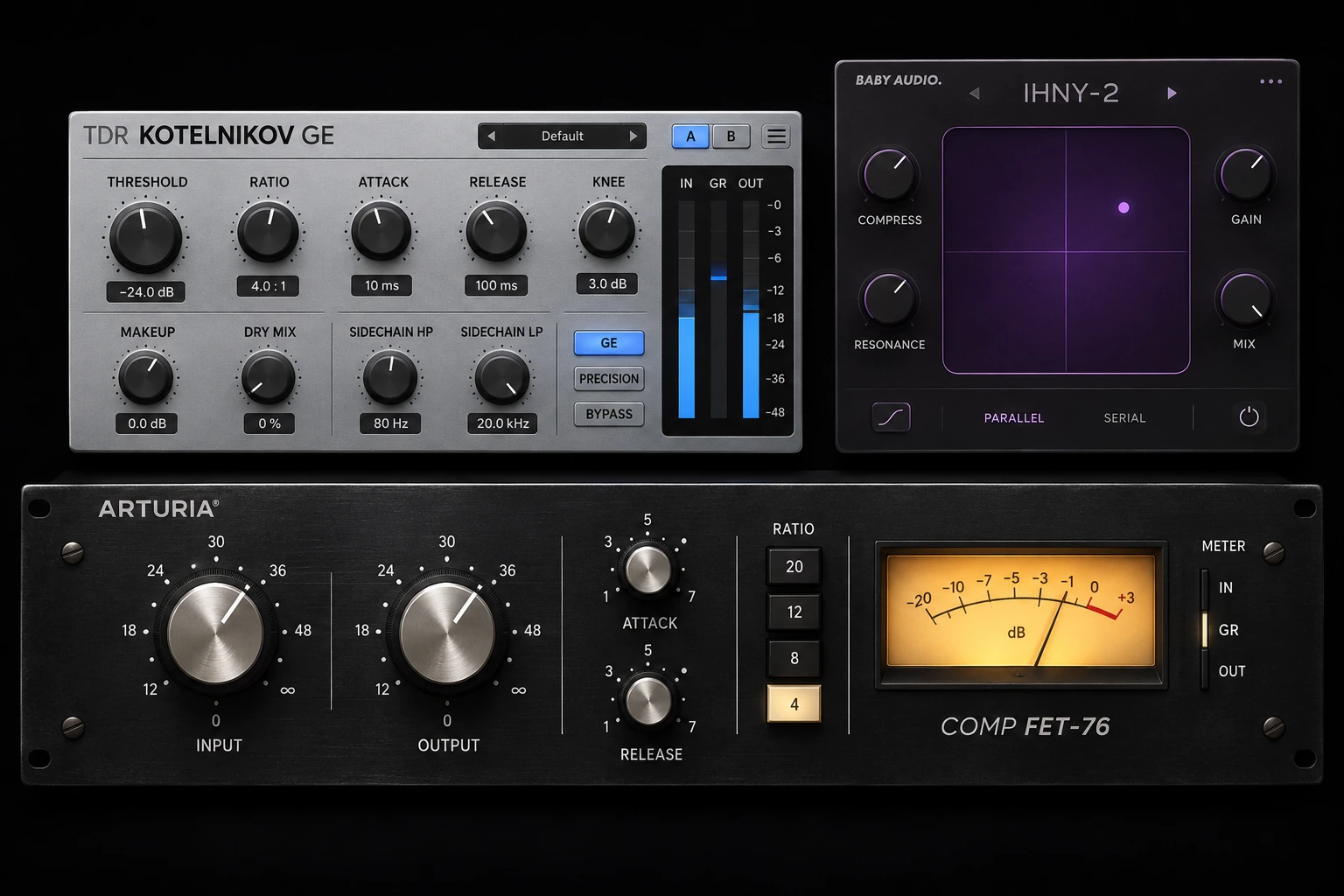

A compressor that catches a loud word can make a whole drum bus feel flat, even if the gain reduction meter shows the same number. If you’re buying one for subtle mix-bus work, TDR Kotelnikov GE is where we’d start at $50. Arturia Comp FET-76 fits sharper peaks on individual tracks, while PSP BussPressor is the more direct choice for a VCA-style bus sound. Baby Audio IHNY-2 makes sense when you want to add a heavily compressed layer underneath the drums.
The table uses full-license U.S. reference prices rather than subscription payments or upgrade offers. The $99 Comp FET-76 figure is a retailer reference, not a universal direct price: Arturia currently displays €79 on the checked regional page. Compare your local total, including tax. The exercises below follow developer documentation and need adjustment to your recording.
Compare the four compressors by mixing task and price
| Plugin | Best starting point | Regular U.S. price | Reason to choose it |
|---|---|---|---|
| TDR Kotelnikov GE | Clean stereo bus control | $50 | Separate peak and RMS release with level-matched comparison |
| Arturia Comp FET-76 | Fast peaks on vocals and other individual tracks | $99 | Input-driven FET compression with familiar ratios and Mix |
| PSP BussPressor | VCA glue on drum and mix buses | $99 | Adjustable detector filtering and an Auto release option |
| Baby Audio IHNY-2 | A dense parallel drum layer | $99 | Wet compression and blend on separate axes of one pad |
1. TDR Kotelnikov GE for keeping a stereo mix steady

Kotelnikov GE’s best use is a mix that already has the tone you want and moves around a little too much from section to section. It has two release paths. Release Peak controls recovery from brief events, such as a snare hit. Release RMS gives sustained material, such as a pad or bass note, a different recovery time. This is handy when a single release setting makes either the percussion feel dull or the whole mix pulse with sustained low end.
Start with 1 to 2 dB of movement on the mix bus
Loop a chorus with kick, bass and a clear snare. Start around 1.5:1, with an Attack of 20 ms, Release Peak near 60 ms and Release RMS near 220 ms. Lower Threshold until the loudest moments show roughly 1 to 2 dB of gain reduction. Leave the more advanced options at their starting settings while you learn what the two release controls do.
Listen to the beginning of a snare hit and the vocal just after it. If the hit feels too rounded, try a slower Attack or a little less gain reduction. If the mix falls back every time the kick lands, try a small increase in Low Freq Relax and listen to the same section. That control changes what drives the detector, leaving the low end in the audio path.
Check what you gained at the same playback level
Let the loudness indicator settle, then use Trim or Equal Loudness Bypass to compare at a similar volume. Listen for whether the vocal sits more steadily in the chorus and the drums still have their front edge. If both settings feel similar, keep the one with more movement or lower the amount of compression until it serves a specific purpose.
When the paid edition makes sense. The free Kotelnikov already gives you the two release controls. GE becomes easier to justify if you use its level-matching tools, finer control over the detector’s low-frequency response or gain-reduction limit often. Start with the free edition if you mainly want to learn the release behavior.
2. Arturia Comp FET-76 for fast peaks on a lead vocal

Comp FET-76 is useful when the loudest syllables jump forward and you want the lead to hold its place without taking all the energy out of the performance. Input determines how hard you drive the compressor and Output sets the level afterward. The Link switch moves Output in the opposite direction as you turn Input. Treat it as a starting point and compare against bypass with your ears and the output meter.
Catch the loud words while keeping the quieter line intact
Loop two lines, ideally with one sudden loud word and one quieter phrase. Select 4:1 and set the meter to GR. Start with Attack toward the slower end of the dial and Release around the middle. Raise Input until the louder syllables show roughly 3 to 5 dB of reduction. Set Output so the vocal stays at a similar apparent level when you bypass the plugin.
Now listen to a T, K or P sound. Move Attack toward Fast if the leading spike still jumps out. If the word gets dull or hard to understand, ease the attack back or use less Input. If a quieter word after the peak sinks too far into the mix, try a faster Release and check how the meter recovers between phrases. A lower Mix setting is also useful if you like the energy of the compressed vocal and want more of the original consonants back.
Use the advanced panel when one part of the vocal drives everything
If a few low plosives cause more reduction than the sung notes, open the sidechain panel and try its High Pass Filter. Adjust it while the same plosive loops and see whether the note that follows returns to its place. The filter changes detector sensitivity. Remove actual rumble with an audio EQ if you can still hear it in the vocal.
Trade-off. The input-driven layout is quick once you know how it reacts to the track level. A threshold-based compressor gives you a more familiar starting point if you prefer to leave input gain alone. For a vocal that only needs small level corrections, compare this with the compressor you already have before buying another compressor.
3. PSP BussPressor for VCA glue on a drum bus

BussPressor is the choice when you want the kick, snare and room mics to move together a little. It puts a classic VCA-style bus workflow on one panel, with Threshold Trim, Attack, Release and Ratio. The detector high-pass helps when the kick decides how much the entire kit gets pushed down.
Let the snare hit through and control what follows it
On a drum bus, start at 2:1, with Attack near 30 ms and Release near 0.2 seconds. Leave Dry In off for the first comparison so you can judge the compressed signal on its own. Lower Threshold Trim until the meter moves by around 1 to 2 dB on the stronger hits. Adjust output level and listen to the kick and snare with the bass back in.
If the snare loses its leading hit, slow the attack or reduce the amount of compression. If the cymbals sink on each kick, raise s.c.hpf gradually. Listen for the point where the kick still contributes to the bus movement and the cymbals stop audibly dropping. A sidechain high-pass that goes too far can leave the kick freer than you intended, so make the decision in the full track.
Compare manual Release and Auto on the busiest fill
With Auto on, the Release knob still sets the base time. The compressor applies a multi-stage response around that setting. Compare it with the manual setting on both a straight groove and a busy fill. If the groove has the right pulse with a fixed release, keep it. If the same setting holds the bus down across a fill and the next downbeat lands smaller, try Auto and compare again at the same level.
Trade-off. We’d choose this over Kotelnikov GE if the shared movement is part of the sound you want. Kotelnikov gives you separate peak and RMS recovery when the drum hits and sustained parts need different treatment. PSP also requires an iLok account and License Manager for its trial or activation, with computer activation available.
4. Baby Audio IHNY-2 for dense parallel drums

IHNY-2 splits the input into a dry path and a compressed path internally. It puts the amount of compression on the horizontal axis and the balance of the two paths on the vertical axis. That makes it easy to find a heavy wet sound and bring it back under the original drum attacks. Its main value is the workflow when you already know you want parallel compression.
Build the compressed layer first, then put it under the kit
Put the plugin on the drum bus and loop a groove with a kick, snare and open hi-hat. Move the pad upward temporarily so you can hear more of the wet path. Move right until the room, decay and quieter hits become more apparent. Now bring the node down until the original snare attack stays out front and the dense layer fills some of the space between hits.
Open Tweak if the wet signal needs work. Try Punch when the compressed layer loses too much attack or Lo-Preserve when the bottom end is being compressed harder than you want. Leave Harmonics and Shape neutral during that comparison. Once the blend works, audition either of them separately if the return needs extra grit or a different tonal balance.
Check the hats before you call the drums punchier
IHNY-2 has internal Autogain with a front-panel adjustment. Match the bypass level after changing the blend, then listen to the hi-hat through a whole bar. If the bus feels bigger because the hats and room have risen too far, lower the wet blend before increasing Punch. The AGR readout accounts for compression and blend, so compare it within IHNY-2. A conventional gain-reduction meter describes a different part of the process.
Trade-off. At $99, IHNY-2 makes most sense when you build this compressed layer often and want the blend, detector shaping and color tools in one place. A stock compressor on a parallel aux can already get you close if all you need is a bit of density behind the dry kit.
Check the FET purchase option
Official reference: Arturia’s Comp FET-76 product and current regional offer.
Conclusion
Pick one track with a problem you can hear. Use the same four or eight bars in your current compressor and the demo. Match the output levels, compare the start and end of each hit or phrase, and decide which result sits better when the rest of the mix plays. For bus compression, listen to the balance of kick, bass and vocal across a section. For a vocal compressor, listen to the loud syllable and the word that follows it. For parallel drums, listen for the point where the wet layer starts changing the cymbal balance.
Choose the demo that addresses the behavior you heard in that comparison. There is little value in buying all four: their different detector, timing and parallel controls matter only when they improve a recurring job.
For a lower budget, see our compressor plugins under $50 guide. For the basics of why timing and ratio change the sound, read what a compressor does in music production.
Control and workflow references
Dual release paths, detector and loudness controls. Kotelnikov GE manual
Input, Output, Mix and the advanced detector. Arturia’s Comp FET-76 control guide
Threshold Trim, Auto, Dry In and detector filters. PSP BussPressor manual
The XY pad, AGR and parallel controls. Baby Audio IHNY-2 manual


