
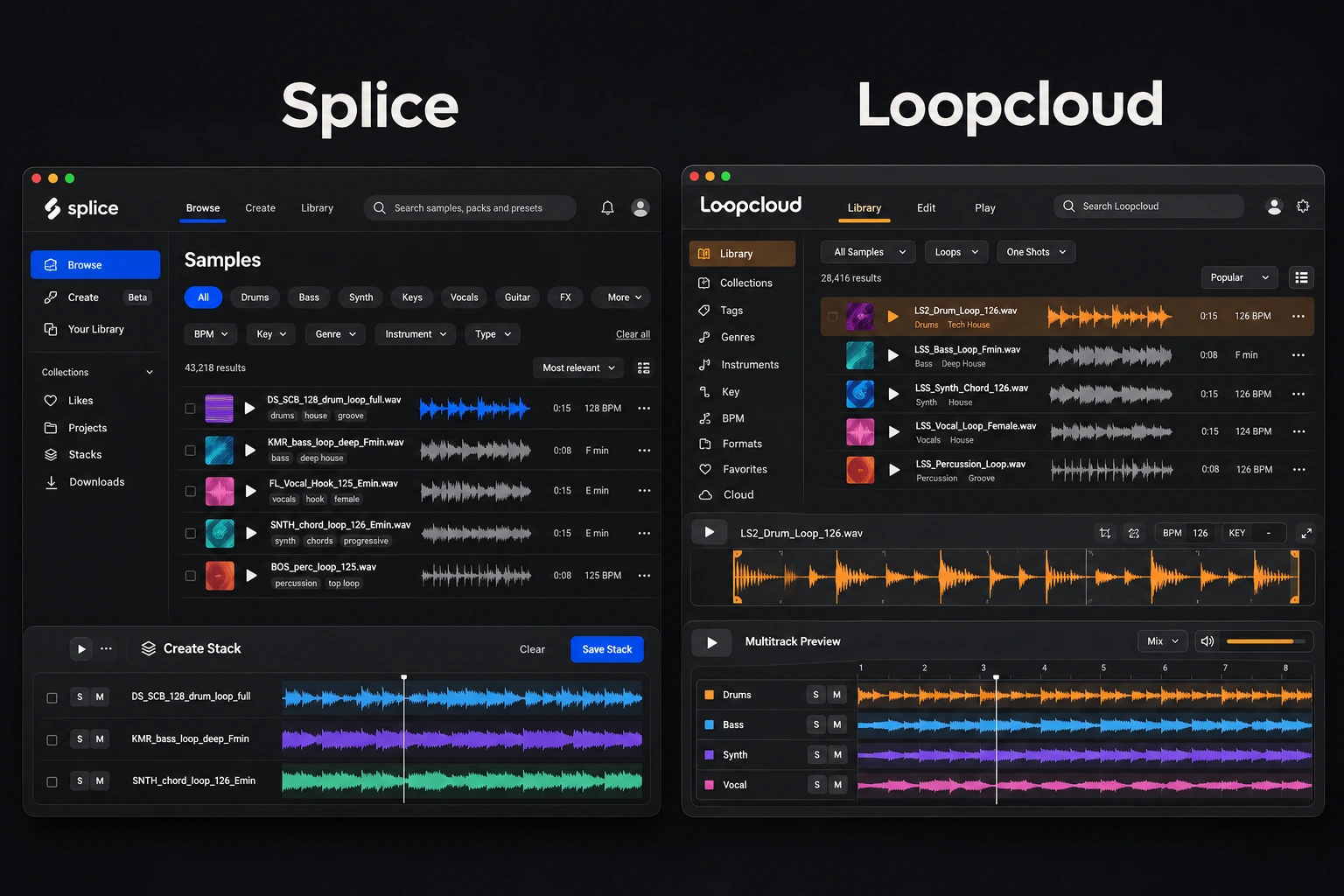

A sample subscription is useful when it helps you find the right sound before you lose the idea. Splice and Loopcloud both offer large catalogues and ways to hear samples in context, but the best choice depends on what you do between searching and dropping a sound into your DAW. Subscription rules also matter if you produce in bursts and take breaks.
Start with Splice if its catalogue and discovery workflow consistently deliver the sounds you want. Start with Loopcloud if editing samples before import and organising your existing collection are priorities. Neither needs to win every feature comparison to be the better fit for your sessions.
Splice vs Loopcloud: practical differences
| Decision | Splice | Loopcloud |
|---|---|---|
| Useful reason to try it | Find individual sounds and develop ideas with Create | Search, reshape and organise samples in one workflow |
| Inside your DAW | Sounds plugin in VST3/AU, plus selected native DAW integrations | SYNC and SOUNDS plugins, plus DRUM and PLAY |
| Working with your own library | Evaluate its discovery tools around the sounds you need | Import and automatically tag an existing sample collection |
| Entry price observed | Sounds: $12.99/month equivalent, billed yearly | Artist: $10.95 monthly, or $109.95 billed annually |
| Unused balance after cancellation | Credits become unavailable after the billing period; expire after the 28-day recovery window | Points remain frozen until you resubscribe |
| Purchased samples | Remain usable under their license after cancellation | Remain usable under their license after cancellation |
USD prices and policies checked November 20, 2026. Plans, introductory offers, taxes and regional pricing can change. Annual equivalents are not monthly billing offers.
Compare the sounds you need before the catalogue size
A large catalogue does not guarantee a useful result for a specific song. Search both services for three concrete tasks: a dry vocal phrase, a particular drum texture and a melodic part in a key you use. Then narrow by tempo, instrument and style.
Judge how many results you would actually put in the track. A hundred broadly relevant loops can be less helpful than five that match the arrangement. Also notice whether you keep returning to the same labels or sound designers. If a service consistently carries those creators, that can outweigh a small difference in subscription price.
Avoid deciding from a pack's polished demonstration alone. The full arrangement may contain layers you do not need, while a single dry sample is easier to evaluate against your own drums and bass. Both services let you select individual sounds, so your shortlist can stay focused.
Splice: discovery, Create and in-DAW browsing
Splice Desktop brings browsing, downloading and Create mode together. Create lets you build a Stack from compatible samples as a starting point for a track. Bridge can synchronise desktop previews with the project's tempo and key, so you can evaluate a candidate against the arrangement before downloading it.
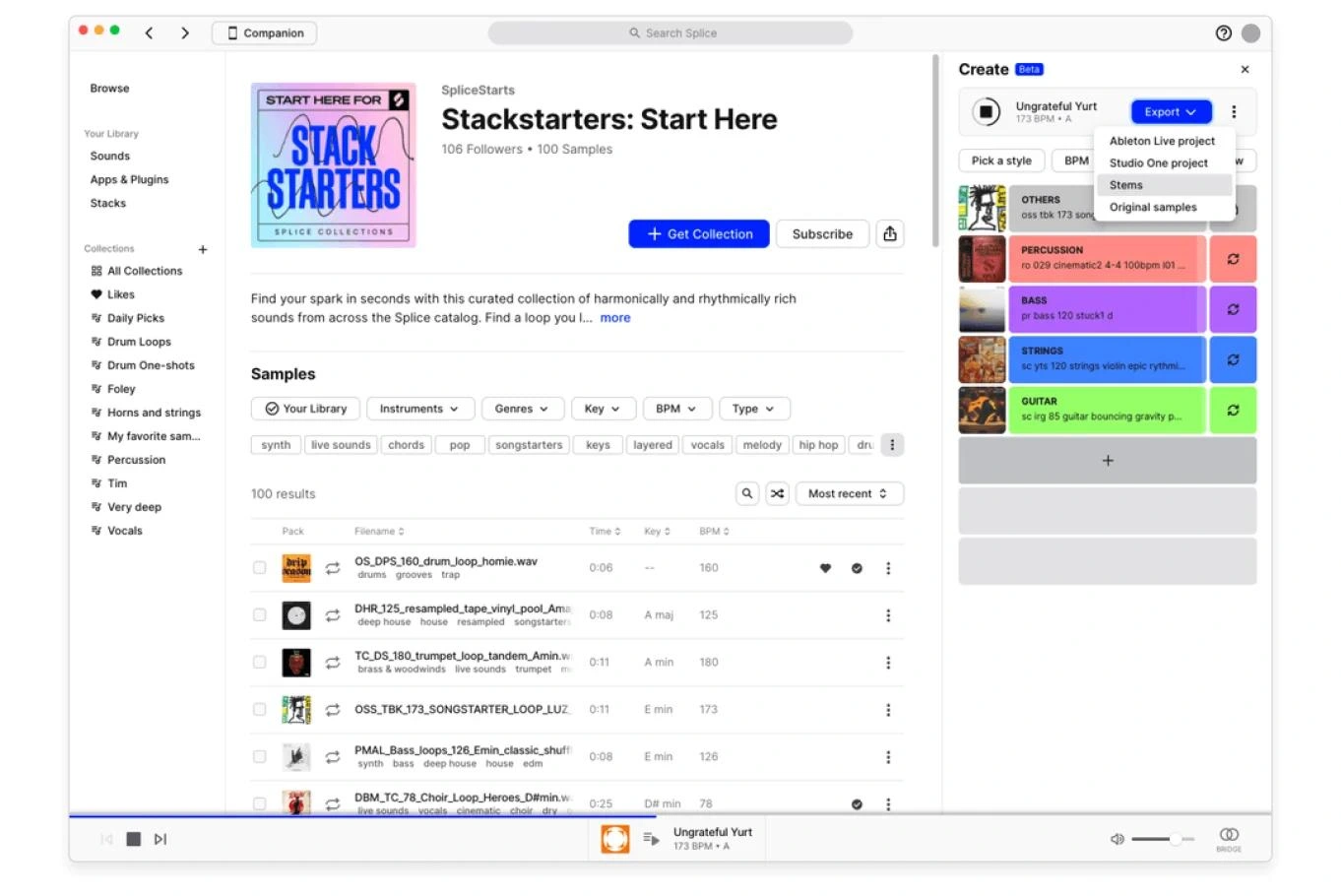
Splice's published Desktop screenshot with sample results and a Create Stack. Layouts may vary with app updates. Image: Splice.
This can suit a producer who wants to find a missing part quickly, then do most editing inside the DAW. The advantage depends on your habits: if you already slice, tune and process samples comfortably in FL Studio, you may not need another detailed editor in the browsing stage.
The Splice Sounds plugin also provides VST3/AU browsing and downloading within a session. It is distinct from Splice's native integrations for selected DAWs. The current FAQ describes Search with Sound, Variations and Drum Pads, while directing whole-pack and multi-sample downloads to Desktop or the website.
Check your plan and host before choosing on that basis. Native integrations and the universal plugin do not have identical functions or allowances. In particular, Splice currently advertises up to 100 daily sample licenses in supported native integrations for Creator and Creator+; that is a specific plan-and-workflow benefit, not an unlimited allowance across every Splice interface.
Loopcloud: edit before import and search what you own
Loopcloud's desktop workflow includes chopping, pitching, stretching and processing samples before they reach the DAW. It also imports and tags existing sample collections. That combination is useful if your problem is not a shortage of sounds, but a hard drive full of packs you rarely revisit.
Try searching an owned library and the store around the same musical task. If the sound you need is already in your collection, finding it is more valuable than spending another point on a similar file. If it needs a different rhythm, Loopcloud's editing stage gives you a way to explore that before committing to an import.
Loopcloud 8 adds tools including Inspire for assembling starting ideas and Listen for suggesting sounds in relation to a playing project. These are reasons to evaluate the current version rather than relying on an old comparison that treats Loopcloud as only a searchable folder.
There is a trade-off: another editing environment is only valuable if it reduces your work. If you preview a loop, edit it in Loopcloud, export it and then repeat the same decisions in your DAW, the extra stage may not help. Test whether it replaces a step you already take.
Prices: compare billing commitments and actual use
The checked Splice page displays Sounds at $12.99 per month, billed yearly, with approximately 100 monthly sample downloads. That works out to $155.88 for the year before applicable taxes. Creator displays a $4.99 first-month offer against a $19.99 monthly price and approximately 200 monthly downloads. Treat that introduction separately from the ongoing expense.
Loopcloud's current pricing page lists Artist at $10.95 per month for 100 points, Studio at $16.95 for 300 points and Professional at $24.95 for 600 points. Its annual totals are $109.95, $169.95 and $249.95 respectively. Annual plans provide annual point allocations.
These packages are not perfectly interchangeable. Compare the point or credit cost of the actual items you want, the billing period and any included tools you will use. Splice's standard credit workflow charges one credit per sample, while presets and MIDI can cost more. Do not assume the number printed beside a plan tells you how many complete packs you can download.
For a practical budget check, suppose you pay $20 in a month and use ten newly downloaded sounds in finished work. That is $2 per used sound. Downloading another hundred files does not improve that result if none reaches a project. Your usage rate is more informative than the maximum allowance.
A monthly plan is often the clearer first experiment when you are unsure about your habits. A discounted annual plan can cost less over a full year but commits more money immediately. Revisit that choice after you know whether the service contributes to finished tracks.
Cancellation is a meaningful difference
Splice's cancellation policy says the plan stays active through the paid billing period. Afterwards, unused credits are unavailable and expire 28 days after that period ends. Resubscribing within that window lets you recover them. Purchased samples remain accessible, and their licenses continue.
Loopcloud's FAQ says unused points stay in the account but cannot be spent without an active subscription. They become available again when you resubscribe. Purchased samples remain yours to use under the license. Uploaded Cloud Storage files are a separate issue: the service says they may be deleted after the post-cancellation retention period of up to 90 days.
If you produce intensively for a few months and then stop, that difference deserves attention. An unused balance is not the same as a folder of licensed, downloaded samples. Before taking a break, check which sounds you actually want to keep available and make local backups of important project files.
Splice also documents a pause option of up to two months, during which new credit spending is unavailable. A short pause may suit a temporary break, but it should not be confused with indefinite preservation of unused credits after cancellation. Check the account's dates before deciding.
Royalty-free does not mean exclusive
Both services describe their downloaded samples as royalty-free for use under their license terms. Splice explicitly states that its sample licenses are non-exclusive: other producers can use the same sound. Its licensing FAQ also explains certified licenses and restrictions on redistributing samples as standalone material or new sample packs.
Keep the receipt or license record associated with the sounds used in a release. For Splice, a certified license can document that permission, but it is not a promise that automated content-recognition systems will never flag a track. Check the relevant platform's requirements when distributing music.
For a creative comparison, the more useful question is what you add to the sample. A distinctive arrangement, performance or edit can matter more than whether the starting loop came from one catalogue or the other.
A fair test before choosing a subscription
- Use one unfinished project. Identify a specific gap, such as a percussion layer or a vocal texture.
- Search both catalogues for that role. Use comparable tempo, key and instrument filters rather than unrelated trending packs.
- Shortlist three candidates per service. Compare them at a sensible level against the same arrangement.
- Test the handoff. Check how much editing is needed before a chosen sound is usable in your DAW.
- Count finished decisions. Record which service helped you settle on a part, not merely how many interesting samples you found.
If you use FL Studio, ordinary downloaded audio can be brought into the Playlist or Channel Rack. You do not need to change DAWs to use either catalogue. Our FL Studio sample-pack guide covers choosing useful material; our drum sample-pack guide is helpful when the missing element is a kit rather than a melodic loop.
Which one should you choose?
Choose Splice when you regularly find the sounds you want there and prefer to take them into your DAW quickly. Create and the available in-DAW tools can add value, especially when they fit the host and plan you already use.
Choose Loopcloud when its editing and library-management workflow solves a problem you encounter often. It is also worth considering when long breaks are normal and retaining unused points matters to you. Compare Loopcloud's current plans against your likely usage.
Skip both for now if you mostly need to learn the sounds you already have. Buying one carefully chosen pack or organising an existing collection can be a better fit than maintaining another subscription. You can always add a service when a repeated need becomes clear.
Conclusion
Splice and Loopcloud overlap enough that catalogue fit and workflow should lead the decision. Splice is a strong candidate for finding individual sounds and developing starting ideas; Loopcloud deserves attention for editing before import and managing an owned collection. Compare current billing terms, test both against the same project and choose the one that helps you finish a musical decision with less effort.
Sources include the current Splice plans, Sounds and integration allowances, Splice cancellation and pause guidance, and Loopcloud features. Checked November 20, 2026.


