


We would choose Portal for a macro-led sound-design workflow, and Efx FRAGMENTS for shaping grain capture and rhythmic behaviour more explicitly. Portal's main page invites you to move an XY control and hear several settings change together. FRAGMENTS puts the stages of granular processing in front of you.
Both can turn a familiar sound into a moving texture, a broken rhythm or an atmospheric layer. Neither is limited to one genre, and Portal also has detailed controls beyond its main page. Your preferred way of editing is the stronger reason to choose.
This comparison is based on current product documentation and suggested workflows. We have not conducted a controlled listening or CPU comparison.
What do these plugins actually do?
Granular processing breaks incoming sound into small pieces called grains, then changes how those pieces play. Grain length, timing, pitch and repetition affect whether the result feels like a restrained echo, a stutter or a sustained cloud.
Portal and FRAGMENTS are audio effects. They process a source on a track or bus; they do not replace the instrument that produces it. A vocal phrase, drum loop, piano recording or synth can give the effect very different material to work with.
That is why a spectacular demonstration does not tell you everything. A preset built around a sustained pad may behave differently on a short snare. Compare both plugins using the sounds you actually produce.
Which one should you try first?
| Your goal | Our first trial choice | What to evaluate |
|---|---|---|
| You want to perform broad changes with a small number of controls. | Portal | Start with a preset, then shape its macro movement. |
| You want to control how grains are captured from a beat. | Efx FRAGMENTS | Investigate its transient and grid-based capture options. |
| You want to learn granular processing by following the signal path. | Efx FRAGMENTS | Its capture, release and modulation sections give the lesson a structure. |
| You want ambient layers or transformed vocal tails. | Try either | Compare them on your own source, rather than choosing by a genre label. |
| You already have one and use it comfortably. | Keep it first | Buy the other only for a workflow you can identify. |
These are our recommendations for starting a comparison, not claims that a feature belongs exclusively to one product. Either can reward preset browsing, detailed editing and automation.
Portal: turn several changes into one gesture
Portal's main page combines an XY control, two macros, preset access and a dry/wet slider. The macros can address multiple parameters, and moving the XY control moves both macros together. Its advanced page exposes grain controls, modulation, effects and master settings.
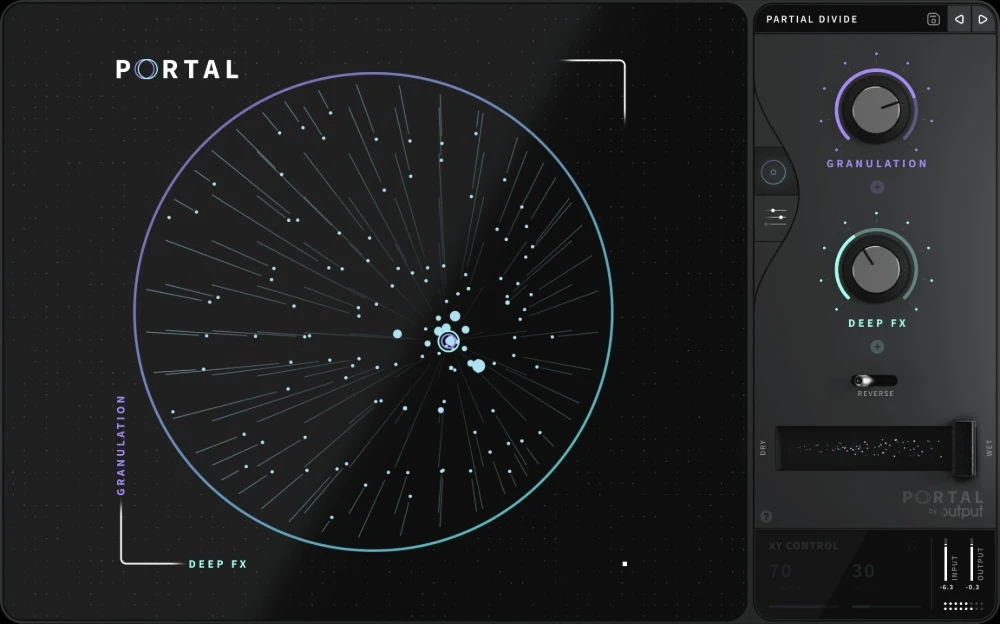
The reason we would investigate Portal first is performance. Suppose the last word of a vocal needs to turn into a transition. We would find a useful starting sound, identify two contrasting positions, then move between them over the end of the phrase.
Keep the gesture purposeful. A move that takes the effect from restrained to unstable can give a transition direction. Constant movement through every possible setting can make the part feel disconnected from the song.
We would record or draw a short movement and listen without watching the display. Does the effect still build into the next section? If not, simplify the movement or shorten the processed phrase.
Portal is also worth considering if you prefer a simpler performance page while keeping deeper editing available. Our Portal review explores its buying case in more detail.
Efx FRAGMENTS: choose where the grains come from
FRAGMENTS separates Buffer, Grain Capture, Grain Release and Pan & FX. It offers Classic, Texture and Rhythmic modes, transient or grid-based grain quantization, pitch quantization, and advanced modulation. Those features give us a concrete reason to try it for rhythm-led experiments.
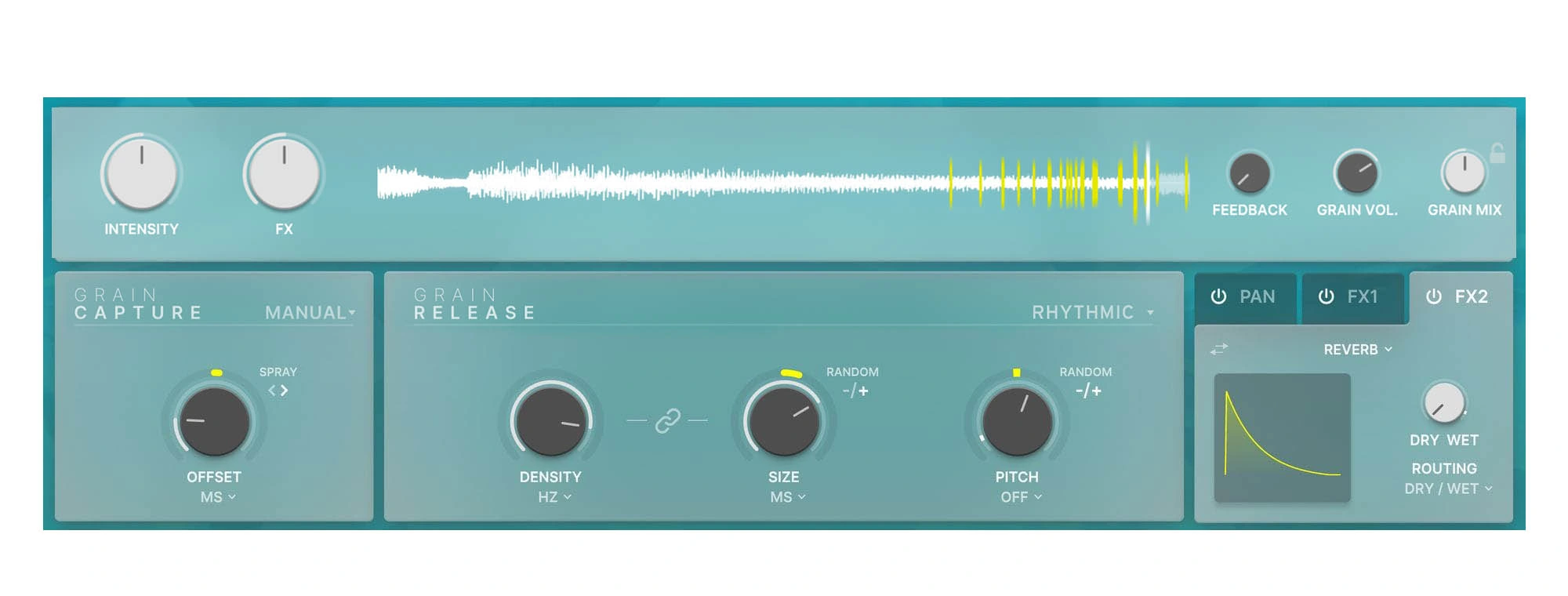
For a percussion loop, we would start by deciding which details should remain recognisable. You might want the opening hit intact and the following sound broken into repeated fragments. Listen for the relationship with the kick, rather than simply increasing activity.
Its visual sections also give you a structured way to learn. Change one capture setting, then one release setting, and compare the results. Keep a saved starting point so you can hear which change actually helped.
Arturia's FAQ makes an important distinction: the coloured outer collars add randomness, while the main knob sets the underlying value. If the sound becomes harder to predict, inspect both rather than assuming the displayed base value tells the whole story.
Our Efx FRAGMENTS review looks more closely at its controls and potential role in a production setup.
Which is better for vocals, drums and ambient sounds?
Vocals: protect the message
For a vocal tail or one-word transition, our first Portal experiment would be a short macro movement. Our first FRAGMENTS experiment would be a controlled grain pattern or texture built from the same phrase.
Keep an unaffected lead available. Judge the effect at the phrase ending and at the start of the next line. If the words become difficult to follow, use less processed signal or apply the effect to a shorter passage.
We would choose by how easily you can reach and revise that result, rather than calling either plugin the universal vocal winner.
Drums: decide what must stay on the grid
FRAGMENTS would be our first trial for deliberately relating grain capture to transients or a rhythmic grid. That is a workflow preference, not a claim that Portal cannot make rhythmic effects; Portal also provides tempo-synced grain delay.
Try processing a percussion layer before putting the effect across the main drum bus. That lets the kick and snare keep their role while another element supplies movement. Compare the full groove after every significant edit.
Ambient layers: leave space for the original track
Both are candidates for turning a sustained source into a background texture. We would use the same plain source and target a supporting layer rather than the most dramatic solo sound.
Listen for pitch clashes, low-frequency buildup and tails that carry into the next chord. A beautiful cloud can still be too busy for the arrangement. Render a few variations and keep the one that complements the track.
A fair comparison session
Use a short vocal phrase and a simple drum loop. Give each plugin two tasks: make one restrained texture and one transition that resolves into the next section.
Keep the source unchanged. Different recordings can make the comparison more about the material than the processor.
Compare at similar output levels. A louder effect can seem more impressive even when it reduces clarity.
Make one revision. After finding a useful result, try changing its rhythm or reducing its intensity. The ability to revise matters as much as the first preset that catches your ear.
Listen to a render. Save the result and hear it away from the interface. Choose the workflow that helps you produce something you want to keep.
When the grains get too busy
With FRAGMENTS, Arturia recommends reducing density, grain size and feedback for more restrained results. Adjust them separately so you can hear which one is creating the problem.
In either plugin, we would also check the dry/wet balance and the amount of modulation. Sometimes a small processed layer supplies enough character. You do not need the effect to dominate every moment.
Check the texture in mono as well as stereo, particularly if it becomes much wider than the source. Keep essential lead and low-end information clear.
Price, ownership and compatibility
Compare current full licences in the same currency. Portal expansions are separate products; a lower-priced expansion is not a substitute for the base plugin. For FRAGMENTS, check your existing Arturia licences and bundle contents before buying it individually.
Both are offered through Plugin Boutique, and FRAGMENTS has a trial listing. Use the current developer pages for any demo terms and supported operating systems. We would not assume both have identical trial or refund arrangements.
Output's installation guide says Portal is loaded from the DAW's effects menu and is not a Kontakt instrument. Arturia uses Arturia Software Center for installation and licence management. Check the current installer and host requirements for your setup before purchase.
We have not measured CPU use. If you plan to run several instances, test a representative project rather than judging performance from one isolated track.
SoundShaper opinion
Portal is our first choice to investigate when the main goal is performing broad, connected changes. Its macro and XY approach gives us a clear starting point for transitions and expressive movement.
FRAGMENTS is our first choice to investigate when the main goal is deliberate grain behaviour. Its capture and release layout makes it a useful candidate for producers who want to understand and adjust how the result is built.
If you already use one comfortably, we would keep it until you can name a limitation that matters. More granular presets are not automatically a reason to buy a second granular effect.
Conclusion
Choose Portal for its macro-led approach to exploration and movement. Choose Efx FRAGMENTS for its explicit grain-capture, rhythmic and modulation workflow.
Compare them on the same source and judge both the first useful sound and the effort needed to revise it. That will tell you more than choosing by appearance or genre.
Sources
Checked on 27 October 2026 against the official Portal manual, Output's installation guidance, Arturia's product information, its FRAGMENTS FAQ and the linked Plugin Boutique listings. Screenshots: Output and Arturia. Trial tasks and buying recommendations are SoundShaper's editorial advice.
![[background image] image of recording equipment (for a musician & band)](https://cdn.prod.website-files.com/68efa70811edd8e5af30a90d/6ae28f3ffeabaf5b76db2580_6ae28f255000f820b159a320_crystalline-review-cover.webp)
![[background image] image of recording equipment (for a musician & band)](https://cdn.prod.website-files.com/68efa70811edd8e5af30a90d/6ae28e7e5d1572089570ac87_6ae28e5eead33b2db2a18b5f_transit-2-review-cover.webp)
![[background image] image of recording equipment (for a musician & band)](https://cdn.prod.website-files.com/68efa70811edd8e5af30a90d/6ae28d603a57759da71022d6_6ae28d41f6af13c91dee9c76_drumazon-2-review-cover.webp)