
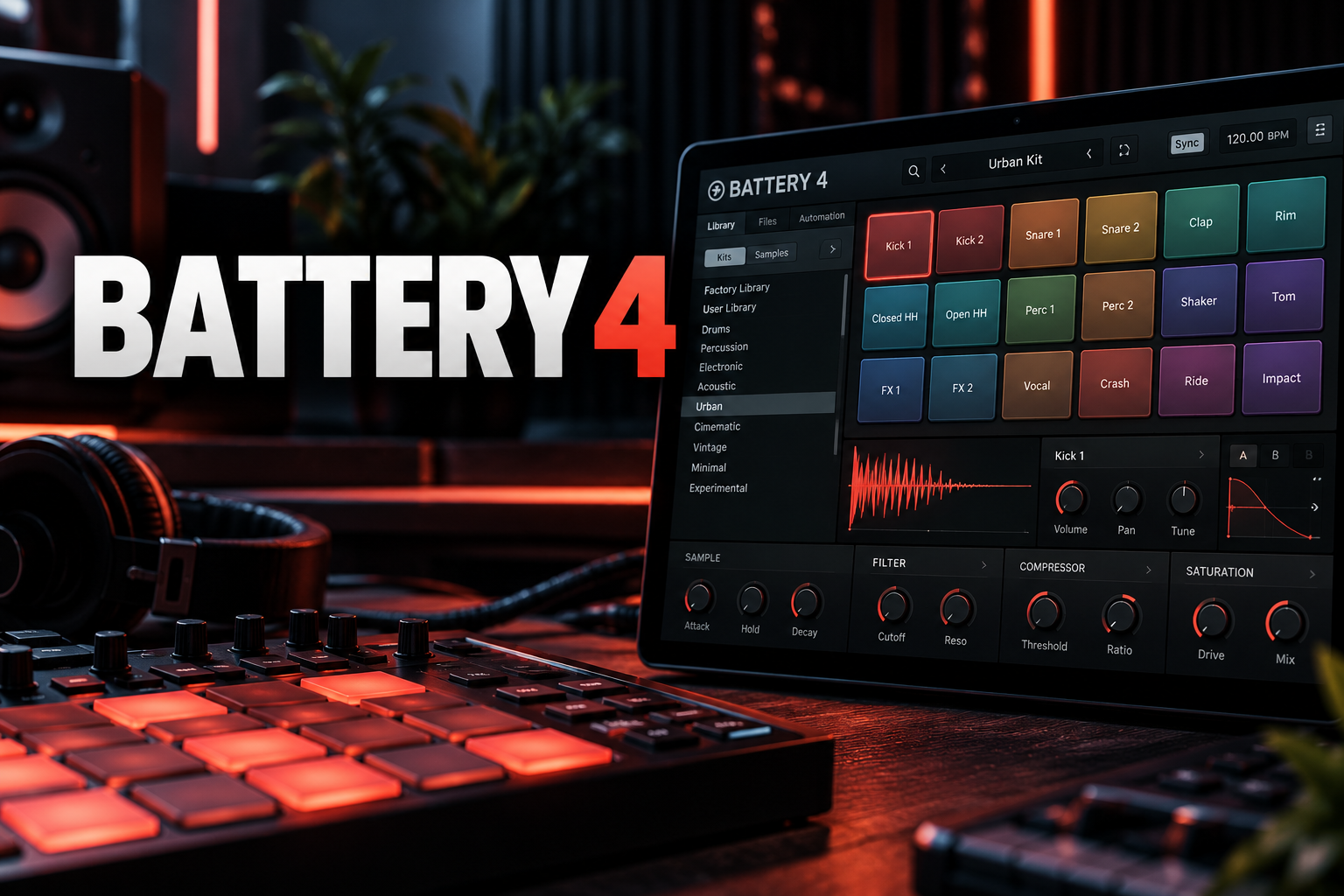

Native Instruments Battery 4 is still one of the fastest dedicated drum samplers for producers who build kits from one-shots. Its grid makes it easy to load a kick, snare, hats and percussion, shape each sound independently and route the result into your DAW without turning the session into a mess of separate sampler tracks.
It is also an unusually old plugin to still be sold as a current product. Battery 4 first appeared years ago, but Native Instruments still sells it, includes it in current Komplete bundles and supports modern plugin formats. That makes the real 2026 question less about whether Battery works and more about whether it is still worth paying for when newer tools now include visual sample maps, internal sequencers and more advanced slicing.
My take: Battery 4 remains excellent at one specific job: building and processing drum kits quickly. I would not buy it because it is the newest drum workflow. I would buy it because the cell-based workflow is mature, fast and easy to control. The bigger issue in 2026 is price.
| Battery 4 at a glance | Details |
|---|---|
| Best for | Building custom drum kits from one-shots with deep per-cell processing |
| Standalone price checked | $199 at Native Instruments and Plugin Boutique |
| Cheaper bundle route | Komplete Select Beats is currently $99 and includes Battery 4 |
| Sequencer | No built-in pattern sequencer; sequence from your DAW |
| Sample engine | Seven sample modes, Time Machine Pro stretching and detailed cell editing |
| Effects | Cell, bus and master processing with NI effects including Transient Master and Solid processors |
| Demo | 30 minutes per session with seven selected kits |
Battery 4 review: the short verdict
Battery 4 is still good, but I would not pay $199 for it standalone while Komplete Select Beats is listed at $99 and includes Battery 4. That bundle also includes other Native Instruments and iZotope tools, so the standalone price makes little sense for most new buyers at the moment.
Once price is separated from the product itself, Battery remains a strong drum sampler. Its biggest strengths are fast kit construction, deep cell-level editing, flexible routing and a mature browser. It does not force you into a specific drum library, and your own WAV files are first-class citizens.
The limitation is equally clear: Battery does not contain the kind of built-in sequencing and sample-discovery workflow found in newer tools such as Algonaut Atlas 2. If you want the plugin itself to generate or sequence the groove, Battery may feel incomplete. If your DAW piano roll is where you already want to write drums, that missing sequencer may not matter at all.
What is Native Instruments Battery 4?
Battery 4 is a dedicated drum sampler from Native Instruments. Rather than trying to be a complete DAW or groovebox, it focuses on loading samples into a cell grid, processing those cells and triggering them from MIDI.
You can load Native Instruments kits, Expansion content or your own samples. Every cell can hold and process its own sound, which makes Battery especially useful for electronic drums, hip-hop kits, trap one-shots and layered percussion.
Native Instruments still positions Battery as a current drum-sampling product, and it remains included in current Komplete packages. That matters because it means Battery is not simply abandoned legacy software that happens to launch on a modern machine.
The grid is still Battery 4's biggest strength
Battery's workflow is built around cells. Load samples into the grid, select the sound you want to edit and make the changes without affecting the rest of the kit. It sounds basic, but a dedicated drum sampler benefits enormously from having all of those decisions visible in one place.
My take: Battery works best when you already know roughly what kit you want. I would not open it to wander through thousands of unknown sounds for half an hour. I would drag in a shortlist of kicks, snares and hats, map them logically and start playing immediately.
The color-coding and MIDI mapping are useful when the kit grows. Keep kicks in one color family, snares in another and percussion in another, and the 128-cell grid stays readable instead of becoming a wall of tiny sample names.
Sample editing: deeper than a basic one-shot player
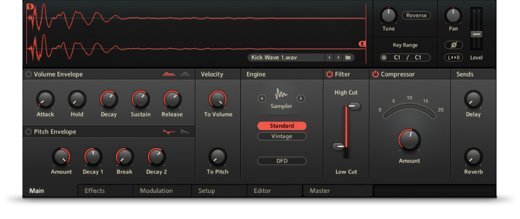
Battery includes seven sample modes, detailed waveform editing and Native Instruments' Time Machine Pro algorithm for time stretching. You can adjust start and end points, shape envelopes, tune samples and alter the way a cell responds without leaving the plugin.
This is where Battery becomes more useful than placing raw WAV files directly on a DAW timeline. A kick that is too long can be tightened inside the kit. A snare can be tuned to sit better with the track. A percussion sound can be reversed or reshaped without creating another audio file.
My take: I would keep the editing practical. Battery can do sound design, but its real speed comes from using a few moves that solve common drum problems quickly: shorten, tune, filter, saturate and route.
Layering kicks, snares and percussion
Layering is one of the main reasons to use a dedicated drum sampler. Battery makes it easy to stack complementary sounds and process them as part of a kit rather than manually aligning several audio clips every time.
For a snare, I might combine a body-heavy sample with a shorter clap or high-frequency snap. For a kick, I would be more careful: layers should solve different jobs rather than simply making the waveform bigger. One layer can supply the transient while another carries the low-frequency body.
Velocity-based behavior also lets a kit respond differently to soft and hard hits. That is useful for acoustic-style programming, but it can also make electronic percussion feel less static.
Choke groups are essential for realistic hats
Battery lets cells cut one another off, which is exactly what you need for open and closed hi-hats. When the closed hat hits, the open hat should stop ringing instead of continuing underneath it.
This is a small feature, but it changes how a programmed kit feels. I would set up choke behavior early rather than treating it as final polish. It affects the groove itself.
Effects and routing are still genuinely strong
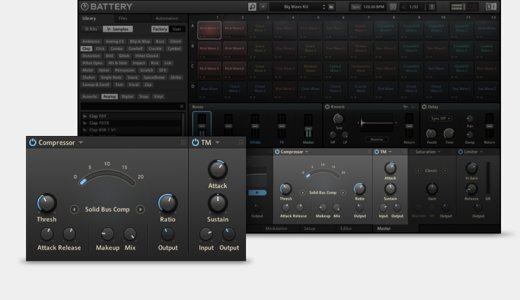
Battery includes processors such as Solid EQ, Solid Bus Comp, Transient Master, tape saturation, LoFi processing and convolution reverb. Effects can be used at cell level, across groups, on four buses or on the master output.
That flexibility is one of Battery's biggest advantages over a minimal sampler. You can sharpen one kick with transient processing, distort one percussion layer and then compress a group without creating a separate DAW channel for every decision.
At the same time, Battery supports individual outputs when you do want full mixer control in the DAW. That makes the internal effects optional rather than restrictive.
My take: keep early sound shaping inside Battery and move to separate outputs when the mix becomes song-specific. That gives you the speed of a self-contained drum instrument without giving up your normal mixing workflow.
Library, browser and Native Instruments Expansions
Battery has a tag-based browser with text search, and Native Instruments Expansions can provide Battery kits alongside their one-shots and loops. That ecosystem matters if you already own Komplete or NI Expansions because you may already have far more Battery content than you realize.
Your own samples are equally important. Battery is not a closed content player, so a folder of favorite drum packs can become a reusable Battery kit with your own mapping, processing and colors.
If your sample library itself is the problem, Battery is not as sophisticated as a visual organizer. That is where a tool such as Atlas 2 has a stronger concept: it maps similar sounds visually and connects that discovery workflow to a sequencer.
Battery 4 has no built-in sequencer — is that a problem?
Battery 4 does not include a traditional drum pattern sequencer. You trigger its cells from MIDI and build the pattern in your DAW, hardware controller or another MIDI source.
For some producers, that is Battery's biggest weakness. Atlas 2, XO, Maschine and many modern drum tools let you build more of the groove inside the instrument itself.
For me, this depends entirely on the DAW. In Ableton Live, FL Studio, Logic or another host with a fast piano-roll or step-sequencing workflow, I do not necessarily want another sequencer inside the plugin. Battery can stay focused on being the drum sound engine.
If you specifically want a self-contained groovebox experience, however, I would not choose Battery first.
The Battery 4 demo is actually useful
Native Instruments currently offers a Battery 4 demo with seven selected kits. The software is functional for 30 minutes per session, after which you can restart it for another test session. Kits created in the demo can only be reopened in an activated full version.
That is enough to answer the important workflow question: do you like building and editing drums on Battery's grid more than using your DAW's stock sampler?
I would test three things: load your own samples, layer and process a snare, then route several cells to separate DAW channels. If those three tasks feel fast, Battery is doing its job.
Battery 4 price: do not buy standalone before checking Komplete
Battery 4 is currently listed at $199 standalone at both Native Instruments and Plugin Boutique. The awkward part is that Plugin Boutique currently lists Komplete Select Beats at $99, and Battery 4 is included in that bundle.
Komplete Select Beats also includes products such as Bite, Cloud Supply, Dirt, Duets, Empire Breaks, Freak, Latin Trap, Massive X Player, Ozone Elements, Supercharger GT and Transient Master FX.
My recommendation: if those prices are still active when you read this, I would buy the $99 bundle rather than Battery 4 alone. Paying twice as much to receive less software makes no sense unless your account has a special standalone upgrade or loyalty price.
Battery 4 standalone vs Komplete Select Beats
| Purchase | Current listed price | What you get | My choice |
|---|---|---|---|
| Battery 4 standalone | $199 | Battery 4 | Only if you have a special account price |
| Komplete Select Beats | $99 | Battery 4 plus a collection of NI/iZotope instruments and effects | Better value for most new buyers |
| Komplete Standard / higher tiers | Higher bundle price | Battery 4 plus a much larger Komplete collection | Worth checking if you were already planning a broader upgrade |
Current Komplete Standard, Ultimate and Collector's Edition bundles also include Battery 4. Before buying Battery separately, check Native Access and your Native Instruments account. You may already own it through a bundle.
Battery 4 vs Atlas 2
| Decision | Battery 4 | Atlas 2 |
|---|---|---|
| Main strength | Fast cell-based kit building and detailed per-cell processing | Visual sample discovery plus kit building and sequencing |
| Your own samples | Excellent | Excellent |
| Sequencer | No dedicated built-in pattern sequencer | Yes |
| Sample discovery | Traditional tag/text browser | AI-assisted visual sample maps |
| Effects/routing | Very strong cell, bus and output routing | More focused on integrated beat workflow |
| My choice | If I already know my sounds and want control | If finding the right sounds is part of the problem |
I would not replace Battery with Atlas automatically. They solve adjacent problems. Battery is a mature drum sampler and processor. Atlas is more interesting when a huge unsorted sample collection is slowing you down.
Battery 4 pros and cons
| Pros | Cons |
|---|---|
| Extremely fast kit-building workflow | No built-in pattern sequencer |
| Strong per-cell, bus and master processing | Standalone $199 price is poor value next to current NI bundles |
| Works well with your own WAV files and NI Expansions | Sample discovery is more traditional than newer visual-map tools |
| Detailed routing and separate outputs | Not designed for deep loop slicing or full groovebox production |
| Long-established workflow with lots of tutorials and existing kits | Its age is obvious compared with newer drum-plugin concepts |
System requirements and plugin formats
Native Instruments currently lists Battery 4 for modern Intel and Apple silicon Macs and Windows systems. The product supports standalone use plus major 64-bit plugin formats including VST3 and AAX, with AU on macOS. Installation and activation use Native Access.
Native Instruments' current product page lists macOS 13, 14 or 15 for Intel systems and current Apple silicon support. Windows support includes current Windows 10 and 11 builds. Requirements can change, so use the current NI product page as the final compatibility check before buying.
Who should buy Battery 4?
I would choose Battery 4 if I build custom drum kits regularly and prefer sequencing in the DAW. Producers making hip-hop, trap, house, techno, pop or other sample-based electronic music can get a lot from its fast cell workflow.
It also makes sense for anyone already deep in the Native Instruments ecosystem. Komplete and Expansion content integrates naturally, and you may already own Battery without realizing it.
I would skip Battery if the main problem is sample organization, if I want a built-in sequencer, or if my DAW's stock sampler already handles everything I need. A plugin does not become valuable just because it has been an industry standard for years.
Final verdict: is Battery 4 worth it in 2026?
Yes as a drum sampler; no at the wrong price. Battery 4 still has an excellent kit-building and per-cell processing workflow. It remains useful because it does not overcomplicate the core task of turning a folder of drum sounds into a playable, mixable instrument.
But the current pricing changes the buying recommendation completely. With Battery 4 listed at $199 standalone while Komplete Select Beats is listed at $99 and includes Battery 4, I would not buy the standalone license as a new customer unless a personalized discount changes the numbers.
If you already own Battery through Komplete, keep using it. If you are choosing between Battery and a newer tool, decide whether you want deep kit control or modern sample discovery and sequencing. That distinction matters more than the age of the plugin.
Frequently asked questions about Battery 4
How much does Battery 4 cost?
Battery 4 is listed at $199 standalone when checked on October 6, 2026. Komplete Select Beats is currently listed at $99 and includes Battery 4, making the bundle a better value for most new buyers at those prices.
Does Battery 4 have a sequencer?
No traditional internal pattern sequencer. Battery is primarily a drum sampler and sound engine, so patterns are normally programmed in your DAW or triggered from external MIDI.
Can Battery 4 load my own samples?
Yes. Your own audio samples can be loaded into Battery cells, organized into kits, processed and mapped to MIDI.
Is Battery 4 included in Komplete?
Yes. Current Native Instruments bundle information includes Battery 4 in Komplete Select Beats and in higher Komplete tiers such as Standard, Ultimate and Collector's Edition.
Is there a Battery 4 demo?
Yes. Native Instruments offers a demo with seven selected kits and 30 minutes of use per session.
Is Battery 4 good for hip-hop and trap?
Yes. Its cell-based one-shot workflow suits kick, snare, hat, percussion and 808-style kit building well, especially if you prefer arranging the pattern in your DAW.
Is Battery 4 better than Atlas 2?
They are better at different things. Battery offers deeper traditional cell-based drum sampling and routing, while Atlas 2 is stronger for visual sample discovery and includes a sequencer.
Research notes and official references
This review combines documented product features with editorial judgments about workflow and buying decisions. It does not claim a controlled hands-on benchmark. Pricing and bundle information were checked on October 6, 2026.
Sources: Native Instruments Battery 4 product page, official Battery 4 demo page, Battery 4 at Plugin Boutique, Komplete Select Beats at Plugin Boutique and Native Instruments Komplete inclusion reference.
![[background image] image of recording equipment (for a musician & band)](https://cdn.prod.website-files.com/68efa70811edd8e5af30a90d/6acd43b8998701bbde84e11a_Best%20Export%20Settings%20for%20FL%20Studio.png)
![[background image] image of recording equipment (for a musician & band)](https://cdn.prod.website-files.com/68efa70811edd8e5af30a90d/6acd3f9347bd0dd62b202621_ShaperBox%203%20vs%20Infiltrator%202.png)
![[background image] image of recording equipment (for a musician & band)](https://cdn.prod.website-files.com/68efa70811edd8e5af30a90d/6acd3d99fa68785e0f58960e_Kontakt%208%20vs%20Decent%20Sampler.png)