
Reverb is one of those effects you can't make music without. It adds space, depth, and life to your sounds. But good reverb plugins are expensive. The pro-level stuff like Valhalla Room or FabFilter Pro-R costs $50-200+.
The good news? Free reverb plugins have gotten insanely good in the last few years. You can now get professional-quality reverb without spending a cent. Some of these free plugins sound better than paid reverbs from 5-10 years ago.
This guide covers the best free reverb plugins you can download right now. We tested dozens of plugins to find the ones that actually sound good and work reliably. Whether you need realistic room reverb for mixing or massive space effects for sound design, you'll find it here.
Before we get into the list, here's what separates great reverb from mediocre reverb. Sound quality is the most important factor. The reverb should sound natural, not metallic or artificial. It should add space without making everything muddy. Low CPU usage matters too because reverb is CPU-intensive. Good plugins sound great without destroying your computer's performance.
Versatility is another key factor. The best reverbs work for multiple purposes like mixing vocals, designing soundscapes, and adding space to drums. Finally, the plugin should be easy to use. You shouldn't need a PhD to get good results. The interface should make sense and let you dial in the sound you want quickly.
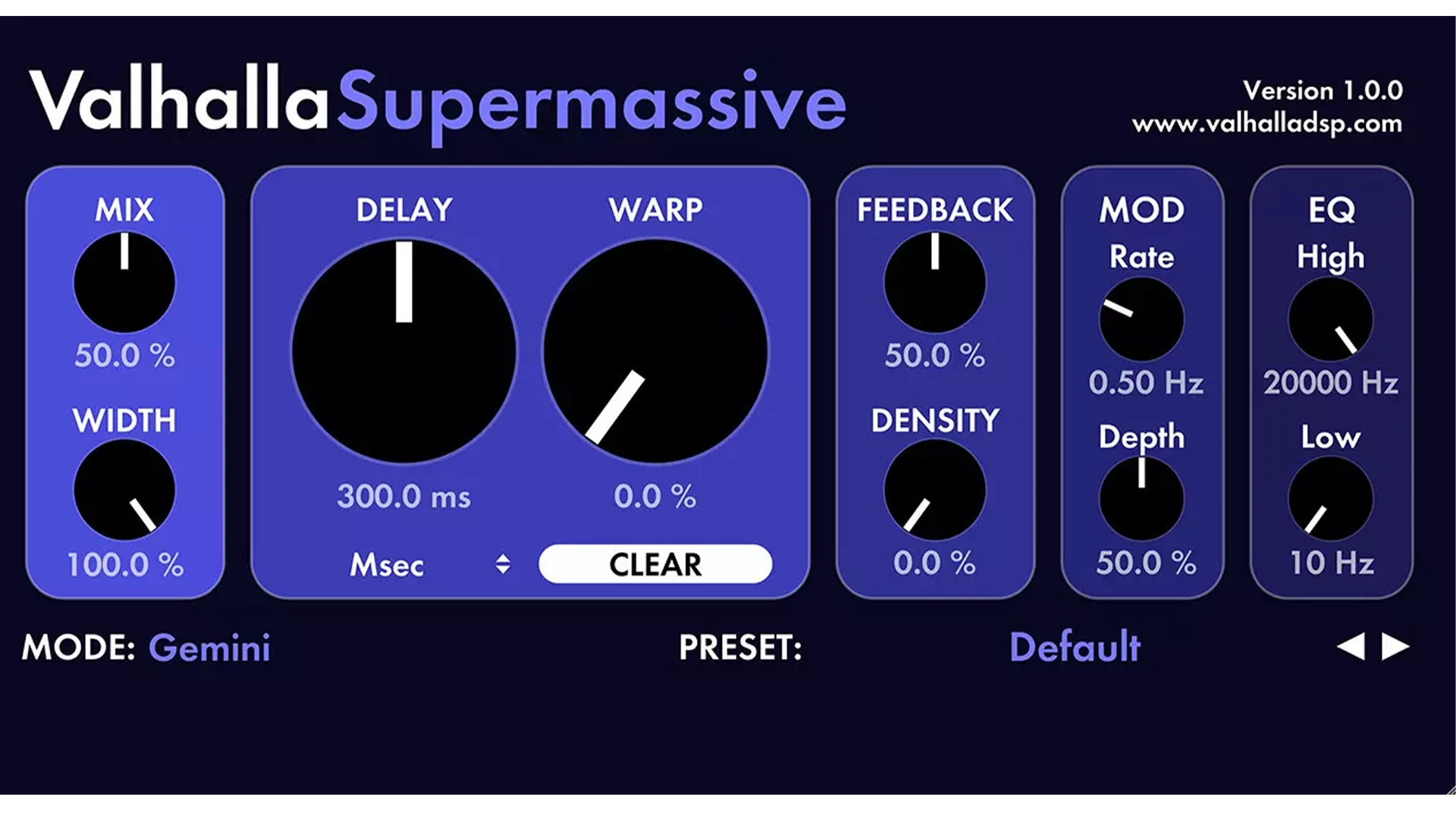
Valhalla Supermassive isn't your typical reverb. It's a hybrid reverb and delay plugin that creates massive, otherworldly spaces. Think infinite halls, evolving textures, and sci-fi soundscapes. This plugin is available for PC and Mac in VST, VST3, AU, and AAX formats, and it uses very little CPU.
The plugin offers 21 different reverb and delay modes, ranging from short echoes to literally infinite reverberation. The WARP knob is the secret weapon. It controls how the feedback delay networks interact, letting you morph between completely different sounds with one control. You can go from a subtle echo to an endless evolving pad just by turning one knob.
Supermassive works great for ambient music and sound design. It's perfect for huge vocal effects, synth pads, atmospheric sounds, and creative drum processing. It's less useful for natural room reverb or subtle mixing tasks. This is a creative tool, not a mixing workhorse. If you need realistic room simulation, look elsewhere. But if you want to create massive, unique spaces that don't exist in the real world, Supermassive is unbeatable.
The plugin has unique algorithms that sound nothing like standard reverb. The 21 modes give you tons of variety, from short metallic echoes to reverbs that last forever. The CPU usage is extremely low considering how complex the sound is. The interface is resizable and includes helpful tooltips. And it's free from Valhalla DSP, a trusted developer known for making some of the best reverb plugins in the industry.
The main downside is that it's not ideal for realistic room sounds. If you're mixing a vocal and need subtle, natural-sounding reverb, Supermassive isn't the right choice. It can also be overwhelming for beginners because of all the options and the unusual sound.
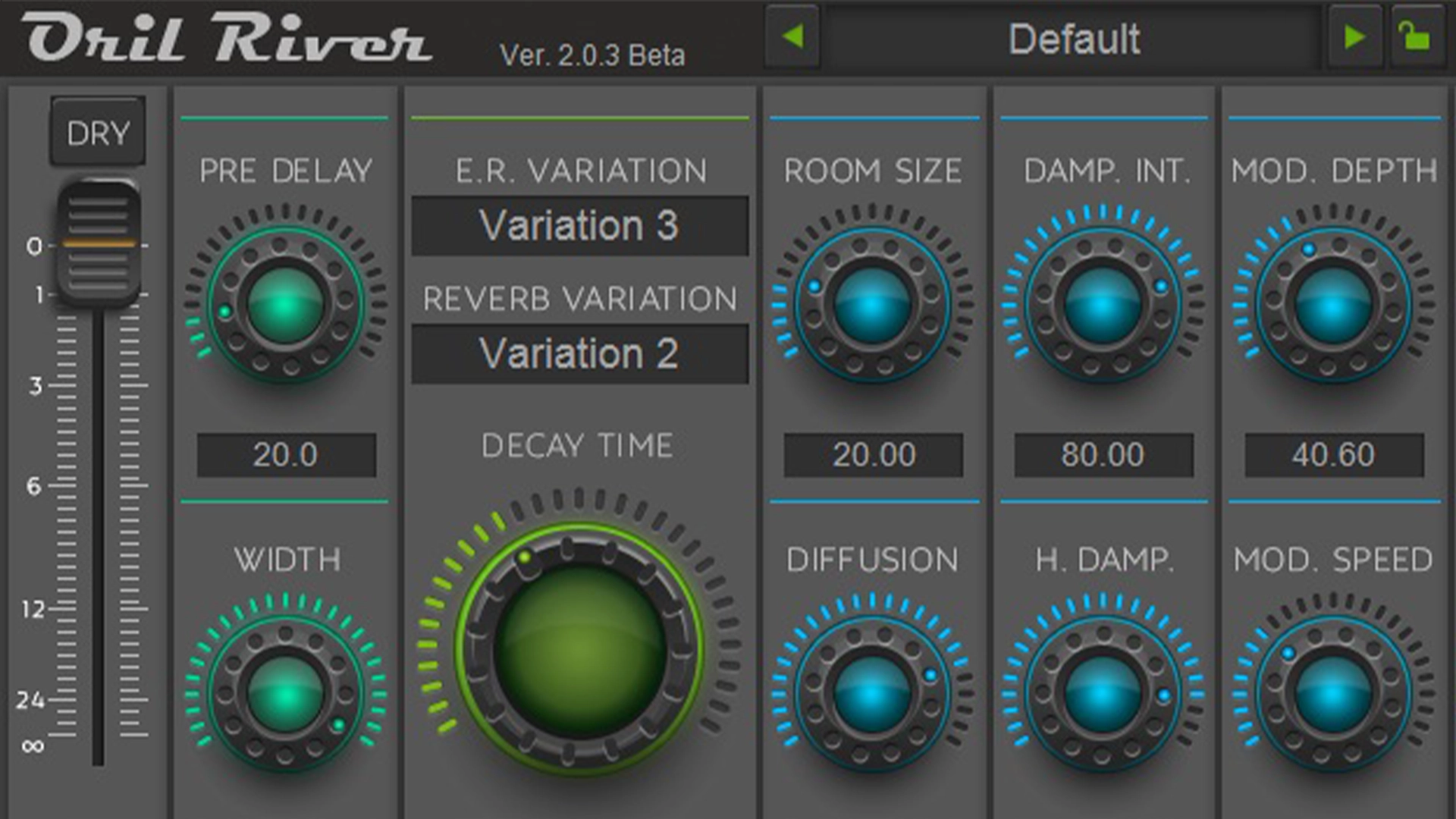
OrilRiver is the best all-around free reverb plugin. It sounds professional, uses minimal CPU, and works for almost any mixing situation. This is the reverb you'll reach for when mixing vocals, drums, or any instrument that needs natural-sounding space.
The plugin delivers beautiful hall reverbs and realistic room simulations. It's available for Windows and Mac in VST and VST3 formats. OrilRiver offers 12 early reflection models and 5 reverb tail types. You can adjust room size, diffusion, damping, modulation, and tone with a built-in 3-band EQ. The interface is clean and organized. Everything makes sense, and you can dial in great-sounding reverb in seconds.
The CPU usage is impressively low, around 4% on most systems. This means you can run multiple instances without problems. You might use one instance for a small room on vocals, another for a large hall on strings, and a third for a plate reverb on drums, all without maxing out your CPU.
OrilRiver is extremely versatile. It works for both mixing and sound design. You can create subtle, realistic room ambience or huge, dramatic halls. The sound quality is professional and competes with paid plugins that cost $50-100. The interface includes light and dark GUI skins, so you can choose the look that works best for your workflow.
The main downside is that it's less exciting than creative reverbs like Supermassive. If you want weird, experimental sounds, OrilRiver isn't the plugin for that. It's also not the most modern-looking interface. It works great, but it looks a bit dated compared to newer plugins.

Dragonfly Reverb is based on the Freeverb3 Hibiki algorithm and sounds incredibly convincing for a free plugin. It covers everything from small rooms to massive halls. The plugin is available for Windows, Mac, and Linux in VST, VST3, AU, and LV2 formats.
The plugin gives you detailed control over early reflections, late reflections, room size, width, diffusion, and more. The visual feedback on the interface helps you understand what each parameter does. You can see how your adjustments affect the reverb's frequency response and decay time.
Dragonfly works great for mixing when you need realistic room simulation. It also excels at sound design when you want huge artificial spaces. The fact that it's open-source and cross-platform is rare for high-quality reverb plugins. If you're on Linux, this is one of your best options.
The sound is realistic and natural. The plugin covers a wide range of room sizes with detailed control options. The visual feedback on the GUI helps you understand what's happening, which is great for learning how reverb works. Being open-source means it's constantly being improved by the community.
The main downsides are moderately high CPU usage on dense settings and an interface that can be intimidating for beginners. If you're new to reverb, all the parameters might be overwhelming. But if you take the time to learn it, Dragonfly is an incredibly powerful tool.

OldSkoolVerb recreates the sound of classic digital reverbs from the 80s and 90s. It has that vintage character that works great on drums, synths, and vocals. The plugin is available for Windows and Mac in VST, VST3, AU, and AAX formats.
The plugin offers multiple reverb modes including room, hall, and plate. It includes a 3-band EQ, pre-delay, and stereo width control. It's simple to use but powerful enough for professional mixing. The interface is straightforward with clearly labeled controls and no unnecessary features.
OldSkoolVerb sounds less realistic than OrilRiver or Dragonfly, but that vintage digital character is perfect for certain genres. If you're making synthwave, lo-fi, hip-hop, or any genre that benefits from that 80s/90s digital reverb sound, OldSkoolVerb is perfect. It adds character and vibe rather than trying to sound like a real space.
The plugin delivers that classic digital reverb sound that's hard to find in modern plugins. The interface is simple and easy to use. CPU usage is low, so you can use multiple instances. It includes multiple reverb modes and a built-in EQ for tone shaping.
The sound is less natural than algorithmic reverbs like OrilRiver or Dragonfly. It's also limited compared to more modern plugins. You won't find the extensive parameter control that newer reverbs offer. But sometimes limitations are good because they force you to work with what you have and make creative decisions.

TAL-Reverb-4 is a vintage plate reverb emulation. It sounds warm, musical, and sits beautifully in a mix without taking up too much space. The plugin is available for Windows and Mac in VST and AU formats.
The plugin is dead simple. It has just a few knobs for decay time, pre-delay, high and low cut filters, and dry/wet mix. This simplicity is a strength. You can dial in great-sounding reverb in seconds without getting lost in dozens of parameters. Sometimes you just want to add some space to a vocal or drum and move on with your production. TAL-Reverb-4 lets you do that.
The plate reverb sound works especially well on vocals and drums. The plate character adds presence and shine without making things muddy. Vocals sit forward in the mix with just enough space around them. Drums get that classic plate reverb punch that you hear on countless hit records.
The plugin delivers a beautiful vintage plate sound. It's extremely simple to use with just the essential controls. CPU usage is low, so you can use it on multiple tracks. It sounds great on vocals and drums without any tweaking.
The main limitation is that it only offers one reverb type, which is plate. You won't find room, hall, or spring reverb modes. The control options are also limited compared to other plugins. If you need extensive parameter control, look elsewhere. But if you want a simple, great-sounding plate reverb, TAL-Reverb-4 is perfect.
With so many options, which one should you download? For mixing when you need realistic rooms and halls, start with OrilRiver. It's versatile, sounds professional, and works for almost everything. For creative sound design, get Valhalla Supermassive. It's free, sounds incredible, and offers unique textures you can't get anywhere else.
If you want vintage character, try OldSkoolVerb or TAL-Reverb-4. Both add that classic digital and plate reverb vibe that works great for certain genres. For massive ambient reverb, download CloudSeed if you're on Windows or Dragonfly Reverb if you need cross-platform support. For realistic convolution reverb, use Ambience if you're on Windows.
Honestly, just download Valhalla Supermassive. It will cover 90% of your reverb needs. Valhalla Supermassive handles all your mixing tasks, and gives you creative options for sound design. Once you master those two, you can explore the others if you need more specific sounds.
Don't overdo it. Too much reverb makes everything muddy. Start with less than you think you need, then add more if necessary. It's easier to add reverb than to remove it from a muddy mix. High-pass your reverb by cutting the low end below 200-300 Hz to keep your mix clean. Most reverb plugins have a built-in high-pass filter. This prevents the reverb from making your low end muddy.
Use pre-delay to separate the dry signal from the reverb. Adding 10-30ms of pre-delay makes vocals and instruments clearer while still giving them space. The dry signal hits first, then the reverb comes in slightly later. This creates separation and clarity.
Automate reverb throughout your track. Use more reverb in breaks and less during busy sections. This keeps your mix dynamic and prevents everything from sounding the same. You can also automate the reverb send level on vocals so certain words or phrases have more space.
Layer reverbs for depth. Use a short room reverb for realism and a longer hall reverb for depth. Blend them together to create a more complex, three-dimensional space. This technique is common in professional mixes and adds a level of polish that single reverbs can't achieve.
You don't need expensive reverb plugins to make professional music. The free options available today are genuinely excellent. Start with Valhalla Supermassive for creative effects.
If you want more options, add Dragonfly Reverb for realistic spaces, OldSkoolVerb for vintage character, or TAL-Reverb-4 for plate reverb. Download a few, experiment, and find the ones that work for your workflow. The only way to learn reverb is by using it.
Need more free plugins? Check out our guide to the best free synth VST plugins.
![[team] image of team member (for a mobile gaming)](https://cdn.prod.website-files.com/68efa70811edd8e5af30a90d/690abaa8987a07a672c4cd2c_channels4_profile.jpg)
![[background image] image of recording equipment (for a musician & band)](https://cdn.prod.website-files.com/68efa70811edd8e5af30a90d/6aa35b3b03d3771388765f76_Main%20Image.png)
![[background image] image of recording equipment (for a musician & band)](https://cdn.prod.website-files.com/68efa70811edd8e5af30a90d/6aa35785b8608362620d46e3_Main%20Image.png)
![[background image] image of recording equipment (for a musician & band)](https://cdn.prod.website-files.com/68efa70811edd8e5af30a90d/6aa351f638777f809800a4ff_Main%20Image.png)